8
8
8
4
1rem
1rem
1rem
1rem
rt-dark-800
headline-3
false
true
basicInfoTitle
12
12
12
12
left
buttonDownload
text-with-icon
secondary
i18n(button-item.download.button-label)
i18n(button-item.download.button-link)
_self


false
buttonContactUs
text-with-icon
secondary
i18n(button-item.contact-us.button-label)
i18n(button-item.contact-us.button-link)
_self


false
36
24
24
12
rt-dark-800
basicInfoSubtitle
basicInfoImageSwitcher
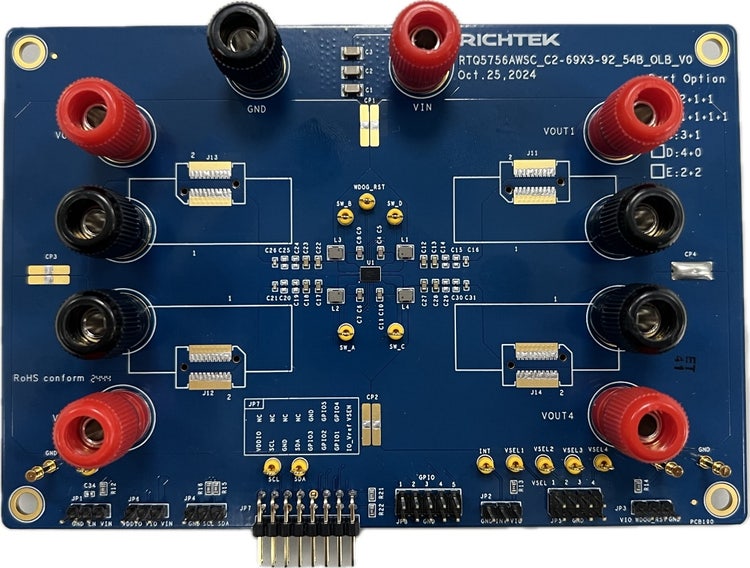
The Evaluation Board demonstrates the RTQ5756A’s capability to be designed for a synchronous buck converter with 4-phase capability, allowing for both multiphase and single-phase operations. The RTQ5756A provides triple outputs with 2+1+1 phase. This flexibility and high integration make the RTQ5756 series suitable for various applications that require high current and compact power management solutions, such as low-power processors, I/O power, the core power of FPGAs, DSPs, and other ASICs. With an input voltage range of 3V to 5.5V, these converters are compatible with a wide variety of low voltage systems. They can deliver up to 10A peak current and support output voltages ranging from 0.4V to 2.05V. The RTQ5756A offers programmable functions, including voltage level, voltage change slew rate, and soft-start slew rate, which can be controlled through an I<sup>2</sup>C interface operating at up to 3.4MHz. Additionally, the device also supports a remote-sense function to ensure accurate output voltage under heavy loads. It is equipped with interrupt and fault-detection functions to report any error status. The RTQ5756A is available in a WL-CSP-54B 2.69x3.92 (BSC) package.
3
EVB_RTQ5756AWSC-00
anchor
overviewSection
i18n(anchor-tab.overview-section.title)
overviewSectionAnchorTab
designResourceSection
i18n(anchor-tab.design-resource-section.title)
designResourceSectionAnchorTab
relatedProductSection
i18n(anchor-tab.related-product-section.title)
relatedProductSectionAnchorTab
orderingInformationSection
i18n(anchor-tab.ordering-information-section.title)
orderingInformationSectionAnchorTab
32
32
32
24
overview
1. General Description
<p class="bady">The Evaluation Board demonstrates the RTQ5756A’s capability to be designed for a synchronous buck converter with 4-phase capability, allowing for both multiphase and single-phase operations. The RTQ5756A provides triple outputs with 2+1+1 phase. This flexibility and high integration make the RTQ5756 series suitable for various applications that require high current and compact power management solutions, such as low-power processors, I/O power, the core power of FPGAs, DSPs, and other ASICs. With an input voltage range of 3V to 5.5V, these converters are compatible with a wide variety of low voltage systems. They can deliver up to 10A peak current and support output voltages ranging from 0.4V to 2.05V.</p> <p class="bady">The RTQ5756A offers programmable functions, including voltage level, voltage change slew rate, and soft-start slew rate, which can be controlled through an I<sup>2</sup>C interface operating at up to 3.4MHz. Additionally, the device also supports a remote-sense function to ensure accurate output voltage under heavy loads. It is equipped with interrupt and fault-detection functions to report any error status. The RTQ5756A is available in a WL-CSP-54B 2.69x3.92 (BSC) package.</p>
2. Performance Specification Summary
<p class="bady">Table 1 shows the summary of the RTQ5756A Evaluation Board performance specification. The ambient temperature is 25°C.</p> <p class="MsoNormal">Table 1. RTQ5756A Evaluation Board Performance Specification Summary</p> <table class="MsoTableLightListAccent2" border="1" cellspacing="0" cellpadding="0" width="680" style="width:510.2pt;border-collapse:collapse;border:none"> <tr style="height:17.0pt"> <td style="border-top:solid #009EB8 1.0pt;border-left:solid #009EB8 1.0pt; border-bottom:none;border-right:none;background:#009EB8;padding:0cm 5.4pt 0cm 5.4pt; height:17.0pt"> <p class="ListParagraph1CxSpFirst">Specification</p> </td> <td style="border:solid #009EB8 1.0pt;border-bottom:none;background:#009EB8; padding:0cm 5.4pt 0cm 5.4pt;height:17.0pt"> <p class="ListParagraph1CxSpMiddle">Test Conditions</p> </td> <td style="border:none;border-top:solid #009EB8 1.0pt;background:#009EB8; padding:0cm 5.4pt 0cm 5.4pt;height:17.0pt"> <p class="ListParagraph1CxSpMiddle">Min</p> </td> <td style="border:solid #009EB8 1.0pt;border-bottom:none;background:#009EB8; padding:0cm 5.4pt 0cm 5.4pt;height:17.0pt"> <p class="ListParagraph1CxSpMiddle">Typ</p> </td> <td style="border:none;border-top:solid #009EB8 1.0pt;background:#009EB8; padding:0cm 5.4pt 0cm 5.4pt;height:17.0pt"> <p class="ListParagraph1CxSpMiddle">Max</p> </td> <td style="border:solid #009EB8 1.0pt;border-bottom:none;background:#009EB8; padding:0cm 5.4pt 0cm 5.4pt;height:17.0pt"> <p class="ListParagraph1CxSpLast">Unit</p> </td> </tr> <tr style="height:17.0pt"> <td style="border:solid #009EB8 1.0pt;border-right:none;padding:0cm 5.4pt 0cm 5.4pt; height:17.0pt"> <p class="ListParagraph1CxSpFirst">Input Voltage Range</p> </td> <td style="border:solid #009EB8 1.0pt;padding:0cm 5.4pt 0cm 5.4pt;height: 17.0pt"> </td> <td style="border-top:solid #009EB8 1.0pt;border-left:none;border-bottom: solid #009EB8 1.0pt;border-right:none;padding:0cm 5.4pt 0cm 5.4pt;height: 17.0pt"> <p class="ListParagraph1CxSpMiddle">3</p> </td> <td style="border:solid #009EB8 1.0pt;padding:0cm 5.4pt 0cm 5.4pt;height: 17.0pt"> <p class="ListParagraph1CxSpMiddle">--</p> </td> <td style="border-top:solid #009EB8 1.0pt;border-left:none;border-bottom: solid #009EB8 1.0pt;border-right:none;padding:0cm 5.4pt 0cm 5.4pt;height: 17.0pt"> <p class="ListParagraph1CxSpMiddle">5.5</p> </td> <td style="border:solid #009EB8 1.0pt;padding:0cm 5.4pt 0cm 5.4pt;height: 17.0pt"> <p class="ListParagraph1CxSpLast">V</p> </td> </tr> <tr style="height:17.0pt"> <td rowspan="2" style="border-top:none;border-left:solid #009EB8 1.0pt; border-bottom:solid #009EB8 1.0pt;border-right:none;padding:0cm 5.4pt 0cm 5.4pt; height:17.0pt"> <p class="ListParagraph1CxSpFirst">Output Current</p> </td> <td style="border-top:none;border-left:solid #009EB8 1.0pt;border-bottom: none;border-right:solid #009EB8 1.0pt;padding:0cm 5.4pt 0cm 5.4pt;height: 17.0pt"> <p class="ListParagraph1CxSpMiddle">Vout1</p> </td> <td style="border:none;padding:0cm 5.4pt 0cm 5.4pt;height:17.0pt"> <p class="ListParagraph1CxSpMiddle">0</p> </td> <td style="border-top:none;border-left:solid #009EB8 1.0pt;border-bottom: none;border-right:solid #009EB8 1.0pt;padding:0cm 5.4pt 0cm 5.4pt;height: 17.0pt"> <p class="ListParagraph1CxSpMiddle">--</p> </td> <td style="border:none;padding:0cm 5.4pt 0cm 5.4pt;height:17.0pt"> <p class="ListParagraph1CxSpMiddle">10</p> </td> <td style="border-top:none;border-left:solid #009EB8 1.0pt;border-bottom: none;border-right:solid #009EB8 1.0pt;padding:0cm 5.4pt 0cm 5.4pt;height: 17.0pt"> <p class="ListParagraph1CxSpLast">A</p> </td> </tr> <tr style="height:17.0pt"> <td style="border:solid #009EB8 1.0pt;padding:0cm 5.4pt 0cm 5.4pt;height: 17.0pt"> <p class="ListParagraph1CxSpMiddle">Vout2, Vout3</p> </td> <td style="border-top:solid #009EB8 1.0pt;border-left:none;border-bottom: solid #009EB8 1.0pt;border-right:none;padding:0cm 5.4pt 0cm 5.4pt;height: 17.0pt"> <p class="ListParagraph1CxSpMiddle">0</p> </td> <td style="border:solid #009EB8 1.0pt;padding:0cm 5.4pt 0cm 5.4pt;height: 17.0pt"> <p class="ListParagraph1CxSpMiddle">--</p> </td> <td style="border-top:solid #009EB8 1.0pt;border-left:none;border-bottom: solid #009EB8 1.0pt;border-right:none;padding:0cm 5.4pt 0cm 5.4pt;height: 17.0pt"> <p class="ListParagraph1CxSpMiddle">5</p> </td> <td style="border:solid #009EB8 1.0pt;padding:0cm 5.4pt 0cm 5.4pt;height: 17.0pt"> <p class="ListParagraph1CxSpLast">A</p> </td> </tr> <tr style="height:17.0pt"> <td style="border:none;border-left:solid #009EB8 1.0pt;padding:0cm 5.4pt 0cm 5.4pt; height:17.0pt"> <p class="ListParagraph1CxSpFirst">Output Voltage Range</p> </td> <td style="border-top:none;border-left:solid #009EB8 1.0pt;border-bottom: none;border-right:solid #009EB8 1.0pt;padding:0cm 5.4pt 0cm 5.4pt;height: 17.0pt"> </td> <td style="border:none;padding:0cm 5.4pt 0cm 5.4pt;height:17.0pt"> <p class="ListParagraph1CxSpMiddle">0.4</p> </td> <td style="border-top:none;border-left:solid #009EB8 1.0pt;border-bottom: none;border-right:solid #009EB8 1.0pt;padding:0cm 5.4pt 0cm 5.4pt;height: 17.0pt"> <p class="ListParagraph1CxSpMiddle">--</p> </td> <td style="border:none;padding:0cm 5.4pt 0cm 5.4pt;height:17.0pt"> <p class="ListParagraph1CxSpMiddle">2.05</p> </td> <td style="border-top:none;border-left:solid #009EB8 1.0pt;border-bottom: none;border-right:solid #009EB8 1.0pt;padding:0cm 5.4pt 0cm 5.4pt;height: 17.0pt"> <p class="ListParagraph1CxSpLast">V</p> </td> </tr> <tr style="height:17.0pt"> <td style="border:solid #009EB8 1.0pt;border-right:none;padding:0cm 5.4pt 0cm 5.4pt; height:17.0pt"> <p class="ListParagraph1CxSpFirst">Operation Frequency</p> </td> <td style="border:solid #009EB8 1.0pt;padding:0cm 5.4pt 0cm 5.4pt;height: 17.0pt"> <p class="ListParagraph1CxSpMiddle">V<sub>OUT</sub> = 1V (FCCM)</p> </td> <td style="border-top:solid #009EB8 1.0pt;border-left:none;border-bottom: solid #009EB8 1.0pt;border-right:none;padding:0cm 5.4pt 0cm 5.4pt;height: 17.0pt"> <p class="ListParagraph1CxSpMiddle">--</p> </td> <td style="border:solid #009EB8 1.0pt;padding:0cm 5.4pt 0cm 5.4pt;height: 17.0pt"> <p class="ListParagraph1CxSpMiddle">2000</p> </td> <td style="border-top:solid #009EB8 1.0pt;border-left:none;border-bottom: solid #009EB8 1.0pt;border-right:none;padding:0cm 5.4pt 0cm 5.4pt;height: 17.0pt"> <p class="ListParagraph1CxSpMiddle">--</p> </td> <td style="border:solid #009EB8 1.0pt;padding:0cm 5.4pt 0cm 5.4pt;height: 17.0pt"> <p class="ListParagraph1CxSpLast">kHz</p> </td> </tr> <tr style="height:17.0pt"> <td style="border:none;border-left:solid #009EB8 1.0pt;padding:0cm 5.4pt 0cm 5.4pt; height:17.0pt"> <p class="ListParagraph1CxSpFirst">Output Ripple Voltage</p> </td> <td style="border-top:none;border-left:solid #009EB8 1.0pt;border-bottom: none;border-right:solid #009EB8 1.0pt;padding:0cm 5.4pt 0cm 5.4pt;height: 17.0pt"> <p class="ListParagraph1CxSpMiddle">V<sub>IN</sub> = 3.7V, V<sub>OUT</sub> = 1V</p> </td> <td style="border:none;padding:0cm 5.4pt 0cm 5.4pt;height:17.0pt"> <p class="ListParagraph1CxSpMiddle">--</p> </td> <td style="border-top:none;border-left:solid #009EB8 1.0pt;border-bottom: none;border-right:solid #009EB8 1.0pt;padding:0cm 5.4pt 0cm 5.4pt;height: 17.0pt"> <p class="ListParagraph1CxSpMiddle">10</p> </td> <td style="border:none;padding:0cm 5.4pt 0cm 5.4pt;height:17.0pt"> <p class="ListParagraph1CxSpMiddle">--</p> </td> <td style="border-top:none;border-left:solid #009EB8 1.0pt;border-bottom: none;border-right:solid #009EB8 1.0pt;padding:0cm 5.4pt 0cm 5.4pt;height: 17.0pt"> <p class="ListParagraph1CxSpLast">mVp-p</p> </td> </tr> <tr style="height:17.0pt"> <td style="border:solid #009EB8 1.0pt;border-right:none;padding:0cm 5.4pt 0cm 5.4pt; height:17.0pt"> <p class="ListParagraph1CxSpFirst">Line Regulation</p> </td> <td style="border:solid #009EB8 1.0pt;padding:0cm 5.4pt 0cm 5.4pt;height: 17.0pt"> <p class="ListParagraph1CxSpMiddle">3V <span lang="EN-GB" style="font-size:10.0pt; font-family:Symbol">£</span> V<sub>IN</sub> <span lang="EN-GB" style="font-size:10.0pt;font-family:Symbol">£</span> 5V, I<sub>OUT(DC)</sub> = 0A (FCCM)</p> </td> <td style="border-top:solid #009EB8 1.0pt;border-left:none;border-bottom: solid #009EB8 1.0pt;border-right:none;padding:0cm 5.4pt 0cm 5.4pt;height: 17.0pt"> <p class="ListParagraph1CxSpMiddle">--</p> </td> <td style="border:solid #009EB8 1.0pt;padding:0cm 5.4pt 0cm 5.4pt;height: 17.0pt"> <p class="ListParagraph1CxSpMiddle">0.2</p> </td> <td style="border-top:solid #009EB8 1.0pt;border-left:none;border-bottom: solid #009EB8 1.0pt;border-right:none;padding:0cm 5.4pt 0cm 5.4pt;height: 17.0pt"> <p class="ListParagraph1CxSpMiddle">--</p> </td> <td style="border:solid #009EB8 1.0pt;padding:0cm 5.4pt 0cm 5.4pt;height: 17.0pt"> <p class="ListParagraph1CxSpLast">%/V</p> </td> </tr> <tr style="height:17.0pt"> <td style="border:none;border-left:solid #009EB8 1.0pt;padding:0cm 5.4pt 0cm 5.4pt; height:17.0pt"> <p class="ListParagraph1CxSpFirst">Load Regulation</p> </td> <td style="border-top:none;border-left:solid #009EB8 1.0pt;border-bottom: none;border-right:solid #009EB8 1.0pt;padding:0cm 5.4pt 0cm 5.4pt;height: 17.0pt"> <p class="ListParagraph1CxSpMiddle">V<sub>IN</sub> = 3.7V, I<sub>OUT(DC)</sub> = 0A to 10A (FCCM)</p> </td> <td style="border:none;padding:0cm 5.4pt 0cm 5.4pt;height:17.0pt"> <p class="ListParagraph1CxSpMiddle">--</p> </td> <td style="border-top:none;border-left:solid #009EB8 1.0pt;border-bottom: none;border-right:solid #009EB8 1.0pt;padding:0cm 5.4pt 0cm 5.4pt;height: 17.0pt"> <p class="ListParagraph1CxSpMiddle">-0.08</p> </td> <td style="border:none;padding:0cm 5.4pt 0cm 5.4pt;height:17.0pt"> <p class="ListParagraph1CxSpMiddle">--</p> </td> <td style="border-top:none;border-left:solid #009EB8 1.0pt;border-bottom: none;border-right:solid #009EB8 1.0pt;padding:0cm 5.4pt 0cm 5.4pt;height: 17.0pt"> <p class="ListParagraph1CxSpLast">%/A</p> </td> </tr> <tr style="height:17.0pt"> <td rowspan="2" style="border-top:solid #009EB8 1.0pt;border-left:solid #009EB8 1.0pt; border-bottom:none;border-right:none;padding:0cm 5.4pt 0cm 5.4pt;height:17.0pt"> <p class="ListParagraph1CxSpFirst">Load Transient Response</p> </td> <td style="border:solid #009EB8 1.0pt;padding:0cm 5.4pt 0cm 5.4pt;height: 17.0pt"> <p class="ListParagraph1CxSpMiddle">1-phase configuration, 0.01A to 2.5A,<br /> t<sub>R</sub> = t<sub>F</sub> = 100ns, L= 0.22<span lang="EN-GB" style="font-size:10.0pt;font-family:Symbol">m</span>H, V<sub>OUT</sub> = 1V,</p> <p class="ListParagraph1CxSpMiddle">C<sub>OUT</sub> = 22<span lang="EN-GB" style="font-size:10.0pt;font-family:Symbol">m</span>F x 2/phase, T<sub>A</sub> = 25<span lang="EN-GB" style="font-size:10.0pt;font-family:Symbol">°</span>C (FCCM)</p> </td> <td style="border-top:solid #009EB8 1.0pt;border-left:none;border-bottom: solid #009EB8 1.0pt;border-right:none;padding:0cm 5.4pt 0cm 5.4pt;height: 17.0pt"> <p class="ListParagraph1CxSpMiddle">--</p> </td> <td style="border:solid #009EB8 1.0pt;padding:0cm 5.4pt 0cm 5.4pt;height: 17.0pt"> <p class="ListParagraph1CxSpMiddle">±50</p> </td> <td style="border-top:solid #009EB8 1.0pt;border-left:none;border-bottom: solid #009EB8 1.0pt;border-right:none;padding:0cm 5.4pt 0cm 5.4pt;height: 17.0pt"> <p class="ListParagraph1CxSpMiddle">--</p> </td> <td style="border:solid #009EB8 1.0pt;padding:0cm 5.4pt 0cm 5.4pt;height: 17.0pt"> <p class="ListParagraph1CxSpLast">mV</p> </td> </tr> <tr style="height:17.0pt"> <td style="border-top:none;border-left:solid #009EB8 1.0pt;border-bottom: none;border-right:solid #009EB8 1.0pt;padding:0cm 5.4pt 0cm 5.4pt;height: 17.0pt"> <p class="ListParagraph1CxSpMiddle">2-phase configuration, 0.01A to 5A,<br /> t<sub>R</sub> = t<sub>F</sub> = 200ns, L= 0.22<span lang="EN-GB" style="font-size:10.0pt;font-family:Symbol">m</span>H, V<sub>OUT</sub> = 1V,</p> <p class="ListParagraph1CxSpMiddle">C<sub>OUT</sub> = 22<span lang="EN-GB" style="font-size:10.0pt;font-family:Symbol">m</span>F x 2/phase, T<sub>A</sub> = 25<span lang="EN-GB" style="font-size:10.0pt;font-family:Symbol">°</span>C (FCCM)</p> </td> <td style="border:none;padding:0cm 5.4pt 0cm 5.4pt;height:17.0pt"> <p class="ListParagraph1CxSpMiddle">--</p> </td> <td style="border-top:none;border-left:solid #009EB8 1.0pt;border-bottom: none;border-right:solid #009EB8 1.0pt;padding:0cm 5.4pt 0cm 5.4pt;height: 17.0pt"> <p class="ListParagraph1CxSpMiddle">±50</p> </td> <td style="border:none;padding:0cm 5.4pt 0cm 5.4pt;height:17.0pt"> <p class="ListParagraph1CxSpMiddle">--</p> </td> <td style="border-top:none;border-left:solid #009EB8 1.0pt;border-bottom: none;border-right:solid #009EB8 1.0pt;padding:0cm 5.4pt 0cm 5.4pt;height: 17.0pt"> <p class="ListParagraph1CxSpLast">mV</p> </td> </tr> <tr style="height:17.0pt"> <td style="border:solid #009EB8 1.0pt;border-right:none;padding:0cm 5.4pt 0cm 5.4pt; height:17.0pt"> <p class="ListParagraph1CxSpFirst">Maximum Efficiency</p> </td> <td style="border:solid #009EB8 1.0pt;padding:0cm 5.4pt 0cm 5.4pt;height: 17.0pt"> <p class="ListParagraph1CxSpMiddle">V<sub>IN</sub> = 3.3V, V<sub>OUT</sub> = 1V, I<sub>OUT</sub> = 1.6A</p> </td> <td style="border-top:solid #009EB8 1.0pt;border-left:none;border-bottom: solid #009EB8 1.0pt;border-right:none;padding:0cm 5.4pt 0cm 5.4pt;height: 17.0pt"> <p class="ListParagraph1CxSpMiddle">--</p> </td> <td style="border:solid #009EB8 1.0pt;padding:0cm 5.4pt 0cm 5.4pt;height: 17.0pt"> <p class="ListParagraph1CxSpMiddle">90.3</p> </td> <td style="border-top:solid #009EB8 1.0pt;border-left:none;border-bottom: solid #009EB8 1.0pt;border-right:none;padding:0cm 5.4pt 0cm 5.4pt;height: 17.0pt"> <p class="ListParagraph1CxSpMiddle">--</p> </td> <td style="border:solid #009EB8 1.0pt;padding:0cm 5.4pt 0cm 5.4pt;height: 17.0pt"> <p class="ListParagraph1CxSpLast">%</p> </td> </tr> </table>
3. Power-Up Procedure
<h3>Suggestion Required Equipment</h3> <ul> <li>RTQ5756A Evaluation Board </li> <li>DC power supply capable of at least 6V and 10A</li> <li>Electronic load capable of 10A</li> <li>Oscilloscope</li> <li>Richtek GUI tool</li> </ul>
4. Quick Start Procedures
<p class="bady">The Evaluation Board is fully assembled and tested. Follow the steps below to verify board operation. Do not turn on supplies until all connections are made. When measuring the output voltage ripple, care must be taken to avoid a long ground lead on the oscilloscope probe. Measure the output voltage ripple by touching the probe tip and ground ring directly across the last output capacitor. </p> <p class="bady">Ensure proper measurement equipment setup, then follow the procedure below: </p> <p class="bady">1. With power off, connect the input power supply to VIN and GND pins.</p> <p class="bady">2. With power off, connect the electronic load between the VOUT1, VOUT2, VOUT3, and nearest GND pins.</p> <p class="bady">3. With power off, connect the GUI tool to the computer through the USB port. Make sure the GUI software is installed on the computer, and the SDA (Serial Data), SCL (Serial Clock), and GND (Ground) signal wires from the Evaluation Board are connected to the corresponding ports on the GUI tool. Moreover, the VIO need to be powered by the same voltage level as SDA/SCL, which can be supplied by GUI tool 3.3V/1.8V.</p> <p class="bady">4. Turn on the power supply at the input. Make sure that the input voltage does not exceed 6V on the Evaluation Board.</p> <p class="bady">5. Use the RTQ5756A GUI to turn on the power rails by writing registers 0x49, 0x63, 0x7D bit0=1.</p> <p class="bady">6. Check for the proper output voltage using a voltmeter. </p> <p class="bady">7. Once the proper output voltage is established, adjust the load within the operating ranges and observe the output voltage regulation, ripple voltage, efficiency, and other performance.</p>
5. Detailed Description of Hardware
<p class="body"><a class="fancybox" href="/content/dam/richtek-eds/resources/evaluation-boards/evb_rtq5756awsc-00/html-images/image001_en.jpg"><img width="527" height="399" src="/content/dam/richtek-eds/resources/evaluation-boards/evb_rtq5756awsc-00/html-images/image001_en.jpg" alt="一張含有 文字, 電路, 電子工程, 電子產品 的圖片 自動產生的描述" /></a></p> <p class="bady">Carefully inspect all the components used in the EVB according to the following Bill of Materials table, and then make sure all the components are undamaged and correctly installed. If there is any missing or damaged component, which may occur during transportation, please contact our distributors or e-mail us at <a href="mailto:evb_service@richtek.com" class="link">evb_service@richtek.com</a>.</p>
6. Test Points
<p class="bady">The EVB is provided with the test points and pin names listed in the table below.</p> <table class="MsoTableLightListAccent2" border="1" cellspacing="0" cellpadding="0" width="680" style="width:510.2pt;border-collapse:collapse;border:none"> <tr style="height:1.0cm"> <td width="15%" valign="top" style="width:15.2%;border-top:solid #009EB8 1.0pt; border-left:solid #009EB8 1.0pt;border-bottom:none;border-right:none; background:#009EB8;padding:0cm 5.4pt 0cm 5.4pt;height:1.0cm"> <p class="23CxSpFirst">Test Point/</p> <p class="23CxSpMiddle">Pin Name</p> </td> <td width="84%" valign="top" style="width:84.8%;border:solid #009EB8 1.0pt; border-bottom:none;background:#009EB8;padding:0cm 5.4pt 0cm 5.4pt;height: 1.0cm"> <p class="23CxSpLast">Function</p> </td> </tr> <tr style="height:17.0pt"> <td width="15%" valign="top" style="width:15.2%;border:solid #009EB8 1.0pt; border-right:none;padding:0cm 5.4pt 0cm 5.4pt;height:17.0pt"> <p class="ListParagraph1CxSpFirst">VIN</p> </td> <td width="84%" valign="top" style="width:84.8%;border:solid #009EB8 1.0pt; padding:0cm 5.4pt 0cm 5.4pt;height:17.0pt"> <p class="ListParagraph1CxSpLast">DC power supply positive input terminal. The input voltage range is from 3V to 5.5V after soft-start is finished.</p> </td> </tr> <tr style="height:17.0pt"> <td width="15%" valign="top" style="width:15.2%;border:none;border-left:solid #009EB8 1.0pt; padding:0cm 5.4pt 0cm 5.4pt;height:17.0pt"> <p class="ListParagraph1CxSpFirst">VOUT1</p> </td> <td width="84%" valign="top" style="width:84.8%;border-top:none;border-left: solid #009EB8 1.0pt;border-bottom:none;border-right:solid #009EB8 1.0pt; padding:0cm 5.4pt 0cm 5.4pt;height:17.0pt"> <p class="ListParagraph1CxSpLast">Electronic load positive output terminal. Draw maximum output current up to 10A.</p> </td> </tr> <tr style="height:17.0pt"> <td width="15%" valign="top" style="width:15.2%;border:solid #009EB8 1.0pt; border-right:none;padding:0cm 5.4pt 0cm 5.4pt;height:17.0pt"> <p class="ListParagraph1CxSpFirst">VOUT2</p> </td> <td width="84%" valign="top" style="width:84.8%;border:solid #009EB8 1.0pt; padding:0cm 5.4pt 0cm 5.4pt;height:17.0pt"> <p class="ListParagraph1CxSpLast">Electronic load positive output terminal. Draw maximum output current up to 5A.</p> </td> </tr> <tr style="height:17.0pt"> <td width="15%" valign="top" style="width:15.2%;border:none;border-left:solid #009EB8 1.0pt; padding:0cm 5.4pt 0cm 5.4pt;height:17.0pt"> <p class="ListParagraph1CxSpFirst">VOUT3</p> </td> <td width="84%" valign="top" style="width:84.8%;border-top:none;border-left: solid #009EB8 1.0pt;border-bottom:none;border-right:solid #009EB8 1.0pt; padding:0cm 5.4pt 0cm 5.4pt;height:17.0pt"> <p class="ListParagraph1CxSpLast">Electronic load positive output terminal. Draw maximum output current up to 5A.</p> </td> </tr> <tr style="height:17.0pt"> <td width="15%" valign="top" style="width:15.2%;border:solid #009EB8 1.0pt; border-right:none;padding:0cm 5.4pt 0cm 5.4pt;height:17.0pt"> <p class="ListParagraph1CxSpFirst">VIO</p> </td> <td width="84%" valign="top" style="width:84.8%;border:solid #009EB8 1.0pt; padding:0cm 5.4pt 0cm 5.4pt;height:17.0pt"> <p class="ListParagraph1CxSpLast">I/O supply voltage for digital communications. Connect this pin to 1.8V or 3.3V.</p> </td> </tr> <tr style="height:17.0pt"> <td width="15%" valign="top" style="width:15.2%;border:none;border-left:solid #009EB8 1.0pt; padding:0cm 5.4pt 0cm 5.4pt;height:17.0pt"> <p class="ListParagraph1CxSpFirst">GND</p> </td> <td width="84%" valign="top" style="width:84.8%;border-top:none;border-left: solid #009EB8 1.0pt;border-bottom:none;border-right:solid #009EB8 1.0pt; padding:0cm 5.4pt 0cm 5.4pt;height:17.0pt"> <p class="ListParagraph1CxSpLast">Reference ground for power supply or electronic load. Provide the ground return path for the control circuitry and low-side power MOSFET.</p> </td> </tr> <tr style="height:17.0pt"> <td width="15%" valign="top" style="width:15.2%;border:solid #009EB8 1.0pt; border-right:none;padding:0cm 5.4pt 0cm 5.4pt;height:17.0pt"> <p class="ListParagraph1CxSpFirst">SW_D</p> </td> <td width="84%" valign="top" style="width:84.8%;border:solid #009EB8 1.0pt; padding:0cm 5.4pt 0cm 5.4pt;height:17.0pt"> <p class="ListParagraph1CxSpLast">Switch node test point. The test point can be used to measure the SW_D signal.</p> </td> </tr> <tr style="height:17.0pt"> <td width="15%" valign="top" style="width:15.2%;border:none;border-left:solid #009EB8 1.0pt; padding:0cm 5.4pt 0cm 5.4pt;height:17.0pt"> <p class="ListParagraph1CxSpFirst">SW_A</p> </td> <td width="84%" valign="top" style="width:84.8%;border-top:none;border-left: solid #009EB8 1.0pt;border-bottom:none;border-right:solid #009EB8 1.0pt; padding:0cm 5.4pt 0cm 5.4pt;height:17.0pt"> <p class="ListParagraph1CxSpLast">Switch node test point. The test point can be used to measure the SW_A signal.</p> </td> </tr> <tr style="height:17.0pt"> <td width="15%" valign="top" style="width:15.2%;border:solid #009EB8 1.0pt; border-right:none;padding:0cm 5.4pt 0cm 5.4pt;height:17.0pt"> <p class="ListParagraph1CxSpFirst">SW_B</p> </td> <td width="84%" valign="top" style="width:84.8%;border:solid #009EB8 1.0pt; padding:0cm 5.4pt 0cm 5.4pt;height:17.0pt"> <p class="ListParagraph1CxSpLast">Switch node test point. The test point can be used to measure the SW_B signal.</p> </td> </tr> <tr style="height:17.0pt"> <td width="15%" valign="top" style="width:15.2%;border:none;border-left:solid #009EB8 1.0pt; padding:0cm 5.4pt 0cm 5.4pt;height:17.0pt"> <p class="ListParagraph1CxSpFirst">SW_C</p> </td> <td width="84%" valign="top" style="width:84.8%;border-top:none;border-left: solid #009EB8 1.0pt;border-bottom:none;border-right:solid #009EB8 1.0pt; padding:0cm 5.4pt 0cm 5.4pt;height:17.0pt"> <p class="ListParagraph1CxSpLast">Switch node test point. The test point can be used to measure the SW_C signal.</p> </td> </tr> <tr style="height:17.0pt"> <td width="15%" valign="top" style="width:15.2%;border:solid #009EB8 1.0pt; border-right:none;padding:0cm 5.4pt 0cm 5.4pt;height:17.0pt"> <p class="ListParagraph1CxSpFirst">EN</p> </td> <td width="84%" valign="top" style="width:84.8%;border:solid #009EB8 1.0pt; padding:0cm 5.4pt 0cm 5.4pt;height:17.0pt"> <p class="ListParagraph1CxSpLast">Enable control test point. The test point can be used to measure the EN signal.</p> </td> </tr> <tr style="height:17.0pt"> <td width="15%" valign="top" style="width:15.2%;border:none;border-left:solid #009EB8 1.0pt; padding:0cm 5.4pt 0cm 5.4pt;height:17.0pt"> <p class="ListParagraph1CxSpFirst">INT</p> </td> <td width="84%" valign="top" style="width:84.8%;border-top:none;border-left: solid #009EB8 1.0pt;border-bottom:none;border-right:solid #009EB8 1.0pt; padding:0cm 5.4pt 0cm 5.4pt;height:17.0pt"> <p class="ListParagraph1CxSpLast">Interrupt indicator test point. The test point can be used to measure the INT signal.</p> </td> </tr> <tr style="height:17.0pt"> <td width="15%" valign="top" style="width:15.2%;border:solid #009EB8 1.0pt; border-right:none;padding:0cm 5.4pt 0cm 5.4pt;height:17.0pt"> <p class="ListParagraph1CxSpFirst">WDOG_RST</p> </td> <td width="84%" valign="top" style="width:84.8%;border:solid #009EB8 1.0pt; padding:0cm 5.4pt 0cm 5.4pt;height:17.0pt"> <p class="ListParagraph1CxSpLast">Watchdog reset control input test point. The test point can be used to measure the WDOG_RST signal.</p> </td> </tr> <tr style="height:17.0pt"> <td width="15%" valign="top" style="width:15.2%;border:none;border-left:solid #009EB8 1.0pt; padding:0cm 5.4pt 0cm 5.4pt;height:17.0pt"> <p class="ListParagraph1CxSpFirst">SDA</p> </td> <td width="84%" valign="top" style="width:84.8%;border-top:none;border-left: solid #009EB8 1.0pt;border-bottom:none;border-right:solid #009EB8 1.0pt; padding:0cm 5.4pt 0cm 5.4pt;height:17.0pt"> <p class="ListParagraph1CxSpLast">Data line for I<sup>2</sup>C interface test point. The test point can be used to measure the SDA signal.</p> </td> </tr> <tr style="height:17.0pt"> <td width="15%" valign="top" style="width:15.2%;border:solid #009EB8 1.0pt; border-right:none;padding:0cm 5.4pt 0cm 5.4pt;height:17.0pt"> <p class="ListParagraph1CxSpFirst">SCL</p> </td> <td width="84%" valign="top" style="width:84.8%;border:solid #009EB8 1.0pt; padding:0cm 5.4pt 0cm 5.4pt;height:17.0pt"> <p class="ListParagraph1CxSpLast">Clock input for I<sup>2</sup>C interface test point. The test point can be used to measure the SCL signal.</p> </td> </tr> <tr style="height:17.0pt"> <td width="15%" valign="top" style="width:15.2%;border:none;border-left:solid #009EB8 1.0pt; padding:0cm 5.4pt 0cm 5.4pt;height:17.0pt"> <p class="ListParagraph1CxSpFirst">VSEL1</p> </td> <td width="84%" valign="top" style="width:84.8%;border-top:none;border-left: solid #009EB8 1.0pt;border-bottom:none;border-right:solid #009EB8 1.0pt; padding:0cm 5.4pt 0cm 5.4pt;height:17.0pt"> <p class="ListParagraph1CxSpLast">Buck1 DVS register selection control input test point. The test point can be used to measure the VSEL1 signal.</p> </td> </tr> <tr style="height:17.0pt"> <td width="15%" valign="top" style="width:15.2%;border:solid #009EB8 1.0pt; border-right:none;padding:0cm 5.4pt 0cm 5.4pt;height:17.0pt"> <p class="ListParagraph1CxSpFirst">VSEL2</p> </td> <td width="84%" valign="top" style="width:84.8%;border:solid #009EB8 1.0pt; padding:0cm 5.4pt 0cm 5.4pt;height:17.0pt"> <p class="ListParagraph1CxSpLast">Buck2 DVS register selection control input test point. The test point can be used to measure the VSEL2 signal.</p> </td> </tr> <tr style="height:17.0pt"> <td width="15%" valign="top" style="width:15.2%;border:none;border-left:solid #009EB8 1.0pt; padding:0cm 5.4pt 0cm 5.4pt;height:17.0pt"> <p class="ListParagraph1CxSpFirst">VSEL3</p> </td> <td width="84%" valign="top" style="width:84.8%;border-top:none;border-left: solid #009EB8 1.0pt;border-bottom:none;border-right:solid #009EB8 1.0pt; padding:0cm 5.4pt 0cm 5.4pt;height:17.0pt"> <p class="ListParagraph1CxSpLast">Buck3 DVS register selection control input test point. The test point can be used to measure the VSEL3 signal.</p> </td> </tr> <tr style="height:17.0pt"> <td width="15%" valign="top" style="width:15.2%;border:solid #009EB8 1.0pt; border-right:none;padding:0cm 5.4pt 0cm 5.4pt;height:17.0pt"> <p class="ListParagraph1CxSpFirst">VSEL4</p> </td> <td width="84%" valign="top" style="width:84.8%;border:solid #009EB8 1.0pt; padding:0cm 5.4pt 0cm 5.4pt;height:17.0pt"> <p class="ListParagraph1CxSpLast">Buck4 DVS register selection control input test point. The test point can be used to measure the VSEL4 signal.</p> </td> </tr> <tr style="height:17.0pt"> <td width="15%" valign="top" style="width:15.2%;border:none;border-left:solid #009EB8 1.0pt; padding:0cm 5.4pt 0cm 5.4pt;height:17.0pt"> <p class="ListParagraph1CxSpFirst">JP1</p> </td> <td width="84%" valign="top" style="width:84.8%;border-top:none;border-left: solid #009EB8 1.0pt;border-bottom:none;border-right:solid #009EB8 1.0pt; padding:0cm 5.4pt 0cm 5.4pt;height:17.0pt"> <p class="ListParagraph1CxSpLast">EN jumper. Connect EN to logic-low to force the device into shutdown mode, connect logic-high to enable the converter.</p> </td> </tr> <tr style="height:17.0pt"> <td width="15%" valign="top" style="width:15.2%;border:solid #009EB8 1.0pt; border-right:none;padding:0cm 5.4pt 0cm 5.4pt;height:17.0pt"> <p class="ListParagraph1CxSpFirst">JP2</p> </td> <td width="84%" valign="top" style="width:84.8%;border:solid #009EB8 1.0pt; padding:0cm 5.4pt 0cm 5.4pt;height:17.0pt"> <p class="ListParagraph1CxSpLast">INT jumper. Connect the INT pin to VIO with a pull-up resistor (R13) when the INT is set as open-drain type output. Leave the INT pin open when the INT is set as push-pull type output.</p> </td> </tr> <tr style="height:17.0pt"> <td width="15%" valign="top" style="width:15.2%;border:none;border-left:solid #009EB8 1.0pt; padding:0cm 5.4pt 0cm 5.4pt;height:17.0pt"> <p class="ListParagraph1CxSpFirst">JP3</p> </td> <td width="84%" valign="top" style="width:84.8%;border-top:none;border-left: solid #009EB8 1.0pt;border-bottom:none;border-right:solid #009EB8 1.0pt; padding:0cm 5.4pt 0cm 5.4pt;height:17.0pt"> <p class="ListParagraph1CxSpLast">WDOG_RST jumper. Connect the WDOG_RST pin to the VIO pin voltage if this pin is not used.</p> </td> </tr> <tr style="height:17.0pt"> <td width="15%" valign="top" style="width:15.2%;border:solid #009EB8 1.0pt; border-right:none;padding:0cm 5.4pt 0cm 5.4pt;height:17.0pt"> <p class="ListParagraph1CxSpFirst">JP4</p> </td> <td width="84%" valign="top" style="width:84.8%;border:solid #009EB8 1.0pt; padding:0cm 5.4pt 0cm 5.4pt;height:17.0pt"> <p class="ListParagraph1CxSpLast">I<sup>2</sup>C interface for Wrenboard or other GUI tools. Connect the SDA/SCL/GND signals to the corresponding ports on the GUI tool.</p> </td> </tr> <tr style="height:17.0pt"> <td width="15%" valign="top" style="width:15.2%;border:none;border-left:solid #009EB8 1.0pt; padding:0cm 5.4pt 0cm 5.4pt;height:17.0pt"> <p class="ListParagraph1CxSpFirst">JP5</p> </td> <td width="84%" valign="top" style="width:84.8%;border-top:none;border-left: solid #009EB8 1.0pt;border-bottom:none;border-right:solid #009EB8 1.0pt; padding:0cm 5.4pt 0cm 5.4pt;height:17.0pt"> <p class="ListParagraph1CxSpLast">VSEL jumper. Connect the VSELx pin to the external control input or GPIOx from the GPIO jumper. Short the unused VSEL pin to GND.</p> </td> </tr> <tr style="height:17.0pt"> <td width="15%" valign="top" style="width:15.2%;border:solid #009EB8 1.0pt; border-right:none;padding:0cm 5.4pt 0cm 5.4pt;height:17.0pt"> <p class="ListParagraph1CxSpFirst">JP6</p> </td> <td width="84%" valign="top" style="width:84.8%;border:solid #009EB8 1.0pt; padding:0cm 5.4pt 0cm 5.4pt;height:17.0pt"> <p class="ListParagraph1CxSpLast">VIO jumper. Connect VIO to VDDIO from the GUI tool. Leave the VIO pin open if VIO is supplied from an external source.</p> </td> </tr> <tr style="height:17.0pt"> <td width="15%" valign="top" style="width:15.2%;border:none;border-left:solid #009EB8 1.0pt; padding:0cm 5.4pt 0cm 5.4pt;height:17.0pt"> <p class="ListParagraph1CxSpFirst">JP7</p> </td> <td width="84%" valign="top" style="width:84.8%;border-top:none;border-left: solid #009EB8 1.0pt;border-bottom:none;border-right:solid #009EB8 1.0pt; padding:0cm 5.4pt 0cm 5.4pt;height:17.0pt"> <p class="ListParagraph1CxSpLast">Mynaboard connector. It provides five GPIO control outputs, an I<sup>2</sup>C interface, and an IO voltage source adjusted by R21 and R22.</p> </td> </tr> <tr style="height:17.0pt"> <td width="15%" valign="top" style="width:15.2%;border:solid #009EB8 1.0pt; border-right:none;padding:0cm 5.4pt 0cm 5.4pt;height:17.0pt"> <p class="ListParagraph1CxSpFirst">JP8</p> </td> <td width="84%" valign="top" style="width:84.8%;border:solid #009EB8 1.0pt; padding:0cm 5.4pt 0cm 5.4pt;height:17.0pt"> <p class="ListParagraph1CxSpLast">GPIO jumper. Use these five GPIO control outputs for VSEL and WDOG_RST control.</p> </td> </tr> </table>
7. Software Installation
<p class="bady">To use the <a href="https://www.richtek.com/Design%20Support/Reference%20Design/RD0001-01?sc_lang=en" class="link">Tool Kit</a> (WrenBoard and Mynaboard) developed by Richtek, you must first install the required driver. Follow the steps below to complete the driver installation. Once the installation is finished, the GUI tool will be ready for use. </p> <p class="bady">Step 1: After downloading the <a href="https://www.richtek.com/Design%20Support/Reference%20Design/RD0001-01?sc_lang=en" class="link">Richtek Bridgeboard Utilities</a>, click on "Richtek Bridgeboard Utilities", and then click the "Install" button to begin the installation process, as shown in Figure 1.</p> <p class="bady"><a class="fancybox" href="/content/dam/richtek-eds/resources/evaluation-boards/evb_rtq5756awsc-00/html-images/image002_en.png"><img border="0" width="378" height="301" src="/content/dam/richtek-eds/resources/evaluation-boards/evb_rtq5756awsc-00/html-images/image002_en.png" alt="一張含有 文字, 螢幕擷取畫面, 陳列, 軟體 的圖片 自動產生的描述" /></a></p> <p class="bady"><a name="_Ref202970571">Figure 1</a>. Driver Installation Step 1</p> <p class="bady">Step 2: As shown in Figure 2, wait for the installation to proceed.</p> <p class="bady"><a class="fancybox" href="/content/dam/richtek-eds/resources/evaluation-boards/evb_rtq5756awsc-00/html-images/image003_en.png"><img border="0" width="378" height="305" src="/content/dam/richtek-eds/resources/evaluation-boards/evb_rtq5756awsc-00/html-images/image003_en.png" alt="一張含有 文字, 電子產品, 螢幕擷取畫面, 陳列 的圖片 自動產生的描述" /></a></p> <p class="bady"><a name="_Ref202970726">Figure 2</a>. Driver Installation Step 2</p> <p class="bady">Step 3: During the installation process, the window will appear, as shown in Figure 3. At this point, press the "YES" button to continue with the installation process.</p> <p class="bady"><a class="fancybox" href="/content/dam/richtek-eds/resources/evaluation-boards/evb_rtq5756awsc-00/html-images/image004_en.png"><img border="0" width="378" height="303" src="/content/dam/richtek-eds/resources/evaluation-boards/evb_rtq5756awsc-00/html-images/image004_en.png" alt="一張含有 文字, 電子產品, 螢幕擷取畫面, 軟體 的圖片 自動產生的描述" /></a></p> <p class="bady"><a name="_Ref202970875">Figure 3</a>. Driver Installation Step 3</p> <p class="bady">Step 4: The installation will continue at this point. Wait for the installation process to proceed further, as shown in Figure 4.</p> <p class="bady"><a class="fancybox" href="/content/dam/richtek-eds/resources/evaluation-boards/evb_rtq5756awsc-00/html-images/image005_en.png"><img border="0" width="378" height="304" src="/content/dam/richtek-eds/resources/evaluation-boards/evb_rtq5756awsc-00/html-images/image005_en.png" alt="一張含有 文字, 螢幕擷取畫面, 字型, 設計 的圖片 自動產生的描述" /></a></p> <p class="bady"><a name="_Ref202971078">Figure 4</a>. Driver Installation Step 4</p> <p class="bady">Step 5 to 7: After clicking the "Next" button in Figure 5, the License Agreement screen will appear, as shown in <br /> Figure 6. Choose to accept and continue by clicking the "Next" button. Then, after confirming the relevant information in Figure 7, click the "Next" button again to proceed.</p> <p class="bady"><a class="fancybox" href="/content/dam/richtek-eds/resources/evaluation-boards/evb_rtq5756awsc-00/html-images/image006_en.png"><img border="0" width="371" height="281" src="/content/dam/richtek-eds/resources/evaluation-boards/evb_rtq5756awsc-00/html-images/image006_en.png" alt="一張含有 文字, 螢幕擷取畫面, 軟體, 電腦圖示 的圖片 自動產生的描述" /></a></p> <p class="bady"><a name="_Ref202971322">Figure 5</a>. Driver Installation Step 5</p> <p class="bady"><a class="fancybox" href="/content/dam/richtek-eds/resources/evaluation-boards/evb_rtq5756awsc-00/html-images/image007_en.png"><img border="0" width="364" height="275" src="/content/dam/richtek-eds/resources/evaluation-boards/evb_rtq5756awsc-00/html-images/image007_en.png" alt="一張含有 文字, 電子產品, 螢幕擷取畫面, 軟體 的圖片 自動產生的描述" /></a></p> <p class="bady"><a name="_Ref202971328">Figure 6</a>. Driver Installation Step 6</p> <p class="bady"><a class="fancybox" href="/content/dam/richtek-eds/resources/evaluation-boards/evb_rtq5756awsc-00/html-images/image008_en.png"><img border="0" width="363" height="275" src="/content/dam/richtek-eds/resources/evaluation-boards/evb_rtq5756awsc-00/html-images/image008_en.png" alt="一張含有 文字, 螢幕擷取畫面, 軟體, 電腦圖示 的圖片 自動產生的描述" /></a></p> <p class="bady"><a name="_Ref202971865">Figure 7</a>. Driver Installation Step 7</p> <p class="bady">Step 8: In Figure 8, you can set the installation path. Once the path is set, click the "OK" button. </p> <p class="bady"><a class="fancybox" href="/content/dam/richtek-eds/resources/evaluation-boards/evb_rtq5756awsc-00/html-images/image009_en.png"><img border="0" width="378" height="285" src="/content/dam/richtek-eds/resources/evaluation-boards/evb_rtq5756awsc-00/html-images/image009_en.png" alt="一張含有 文字, 螢幕擷取畫面, 陳列, 軟體 的圖片 自動產生的描述" /></a></p> <p class="bady"><a name="_Ref202972400">Figure 8</a>. Driver Installation Step 8</p> <p class="bady">Step 9: Figure 9 is a confirmation step to verify the installation path. If the information is correct, click the "Next" button to proceed with the rest of the installation.</p> <p class="bady"><a class="fancybox" href="/content/dam/richtek-eds/resources/evaluation-boards/evb_rtq5756awsc-00/html-images/image010_en.png"><img border="0" width="378" height="286" src="/content/dam/richtek-eds/resources/evaluation-boards/evb_rtq5756awsc-00/html-images/image010_en.png" alt="一張含有 文字, 螢幕擷取畫面, 軟體, 電腦圖示 的圖片 自動產生的描述" /></a></p> <p class="bady"><a name="_Ref202972687">Figure 9</a>. Driver Installation Step 9</p> <p class="bady">Step 10 to 12: As shown in Figure 10, after confirming that all information is correct, click the "Install" button and wait for the installation progress bar to complete, as depicted in Figure 11. Once the installation is finished, click "Finish" to complete the entire driver installation process, as shown in Figure 12.</p> <p class="bady"><a class="fancybox" href="/content/dam/richtek-eds/resources/evaluation-boards/evb_rtq5756awsc-00/html-images/image011_en.png"><img border="0" width="371" height="279" src="/content/dam/richtek-eds/resources/evaluation-boards/evb_rtq5756awsc-00/html-images/image011_en.png" alt="一張含有 文字, 螢幕擷取畫面, 軟體, 電腦圖示 的圖片 自動產生的描述" /></a></p> <p class="bady"><a name="_Ref202972631">Figure 10</a>. Driver Installation Step 10</p> <p class="bady"><a class="fancybox" href="/content/dam/richtek-eds/resources/evaluation-boards/evb_rtq5756awsc-00/html-images/image012_en.png"><img border="0" width="364" height="276" src="/content/dam/richtek-eds/resources/evaluation-boards/evb_rtq5756awsc-00/html-images/image012_en.png" alt="一張含有 文字, 螢幕擷取畫面, 軟體, 電腦圖示 的圖片 自動產生的描述" /></a></p> <p class="bady"><a name="_Ref202972635">Figure 11</a>. Driver Installation Step 11</p> <p class="bady"><a class="fancybox" href="/content/dam/richtek-eds/resources/evaluation-boards/evb_rtq5756awsc-00/html-images/image013_en.png"><img border="0" width="371" height="284" src="/content/dam/richtek-eds/resources/evaluation-boards/evb_rtq5756awsc-00/html-images/image013_en.png" alt="一張含有 文字, 螢幕擷取畫面, 軟體, 作業系統 的圖片 自動產生的描述" /></a></p> <p class="bady"><a name="_Ref202972638">Figure 12</a>. Driver Installation Step 12</p> <p class="bady">Step 13: The RTQ5756_Setup_File for the RTQ5756A can be downloaded from the RTQ5756 official website under the Design Tools tab. After downloading, unzip the file and click the installer to begin the installation. Figure 13 demonstrates the installation process.</p> <p class="bady"><a class="fancybox" href="/content/dam/richtek-eds/resources/evaluation-boards/evb_rtq5756awsc-00/html-images/image014_en.png"><img border="0" width="378" height="309" src="/content/dam/richtek-eds/resources/evaluation-boards/evb_rtq5756awsc-00/html-images/image014_en.png" alt="一張含有 文字, 電子產品, 螢幕擷取畫面, 陳列 的圖片 自動產生的描述" /></a></p> <p class="bady"><a name="_Ref202972649">Figure </a>13. RTQ5756_GUI Installation Step 13</p> <p class="bady">Step 14: During the installation process, set the installation path as needed, then continue with the installation until the software is completely installed. Once installation is complete, the RTQ5756_GUI can be used. Figure 14 shows the progress bar of the installation process.</p> <p class="bady"><a class="fancybox" href="/content/dam/richtek-eds/resources/evaluation-boards/evb_rtq5756awsc-00/html-images/image015_en.png"><img border="0" width="378" height="311" src="/content/dam/richtek-eds/resources/evaluation-boards/evb_rtq5756awsc-00/html-images/image015_en.png" alt="一張含有 文字, 螢幕擷取畫面, 軟體, 陳列 的圖片 自動產生的描述" /></a></p> <p class="bady"><a name="_Ref202972657">Figure 14</a>. RTQ5756_GUI Installation Step 14</p>
8. Graphical User Interface Overview
<p class="bady">The RTQ5756A Evaluation Board includes the RTQ5756 GUI, which allows users to control the RTQ5756A. <br /> Figure 15 shows the user-friendly Graphical User Interface. </p> <p class="MsoNormal"><a class="fancybox" href="/content/dam/richtek-eds/resources/evaluation-boards/evb_rtq5756awsc-00/html-images/image016_en.png"><img border="0" width="684" height="368" src="/content/dam/richtek-eds/resources/evaluation-boards/evb_rtq5756awsc-00/html-images/image016_en.png" alt="一張含有 文字, 螢幕擷取畫面, 軟體, 多媒體軟體 的圖片 自動產生的描述" /></a></p> <p class="MsoCaption"><a name="_Ref202977988">Figure </a>15. RTQ5756 Graphical User Interface</p>
9. Quick Operation of the RTQ5756 EVB Software
<p class="bady">The RTQ5756 GUI offers two methods for executing commands: </p> <ul> <li>Method 1: Direct command entry via the “Apply” button.</li> <li>Method 2: Write the desired commands in the “Script” window, and then press the “RUN” button. </li> </ul> <h4>Method 1: Direct command entry via the “Apply” button.</h4> <p class="bady">Step 1 to 4 introduce how to check the device connection, power on/off settings, output control settings, and other function setup. Users can easily complete the setup through direct command entry. </p> <p class="bady">Step 1: Check the device connection status before getting start! </p> <ul> <li>Ensure that the Status shows green light and displays “Connect Success!”.</li> <li>Check the device “Slave Address” is right.</li> </ul> <p class="bady">Step 2: Power on/off settings in the “Main” page</p> <ul> <li>Set the soft-start speed using “SS_SLEW” (options: 10,5,2.5,1.25 mV/us).</li> <li>Enable the device through the EN pin, and the delay time can be read from “EN_DLY” (range: from 0~63ms).</li> <li>Shut down through the EN pin, and the delay time can be set and read from “SHUTDN_DLY” (range: from 0~63ms).</li> </ul> <p class="bady">Step 3: Output control settings in the “Main” page</p> <ul> <li>Set DVS control using “DVSPIN_CTRL” (use DVS0/DVS1/VSELx settings).</li> <li>Change the VSEL pin polarity through “DVSPIN_POL” (VSEL: 0=DVS0; 1=DVS1 or 0=DVS1; 1=DVS0).</li> <li>Enable or disable the power rail by checking the option “ENDVS” (DVS or DVS1: on/off).</li> <li>Select operation mode using “DVSMODE” (DVS0 or DVS1: FCCM/AUTO).</li> <li>Set dynamic voltage scaling via “DVS” (DVS or DVS1: 0.4V to 2.05V).</li> <li>Set DVS up mode using “DVS_UP” (FCCM/Auto mode).</li> <li>Set DVS down mode using “DVS_DOWN” (FCCM/Decay).</li> <li>Control DVS up and down speed control through “RSPUP” and “RSPDN” (16/8/4/2/1/0.5 mV/us).</li> </ul> <p class="bady">Step 4: Other function setup in the “Mask & Protection” and “Other” pages</p> <ul> <li>Mask Power rail protection events: PG/OC/OV/UV/UVLO/Hot DIE/OT.</li> <li>Select Protection type for each power rail: UV Hiccup/UV Shutdown.</li> <li>Set INT pin CMOS type: Open drain/sourcing and sinking (push-pull).</li> <li>Configure INT pin INVERT option: Active low/active high.</li> <li>Select Watchdog reset power rail: Buck1/Buck2/Buck3.</li> <li>Set Watchdog reset delay time: 0/1.56/3.125/6.25/12.5/9/15.25/14.5ms.</li> <li>Reset all registers to default values.</li> </ul> <h4>Method 2: Write the desired commands in the “Script” window, and then press the “RUN” button.</h4> <p class="bady">The following methods show how to implement power on/off sequence control to achieve 100us delay between Buck1 and Buck2, and 200us delay between Buck2 and Buck3 via the “Script” function, which is only supported by the Richtek GUI tool “Mynaboard”. </p> <li>Perform the power on through the I<sup>2</sup>C command in Script</li> <p class="bady">Line 1: W 0x49 0x21 </p> <p class="bady">Line 2: Delay (0.1) </p> <p class="bady">Line 3: W 0x63 0x21 </p> <p class="bady">Line 4: Delay (0.2) </p> <p class="bady">Line 5: W 0x7D 0x21 </p> <li>Perform the power on through the VSEL pin</li> <p class="bady">Set the DVS control to VSELx, and make sure the VSEL polarity meet the I/O control requirements. The Richtek GUI tool “Mynaboard” offers five GPIO ports for users to control the I/O pin. The RTQ5756A possesses three VSEL pins (VSEL1/2/3), which can be controlled by GPIO1/2/3, respectively. The commands are shown as follows:</p> <p class="bady">Line 1: GPIO (1) (High) </p> <p class="bady">Line 2: Delay (0.1) </p> <p class="bady">Line 3: GPIO (2) (High) </p> <p class="bady">Line 4: Delay (0.2) </p> <p class="bady">Line 5: GPIO (3) (High) </p>
10. Bill of Materials
<div> <table class="TableNormal1" border="1" cellspacing="0" cellpadding="0" width="680" style="border-collapse:collapse;border:none"> <thead> <tr style="height:17.0pt"> <td width="104" style="width:77.75pt;border:solid #009EB8 1.0pt;background: #009EB8;padding:0cm 0cm 0cm 0cm;height:17.0pt"> <p class="TableParagraph">Reference</p> </td> <td width="38" style="width:1.0cm;border:solid #009EB8 1.0pt;border-left:none; background:#009EB8;padding:0cm 0cm 0cm 0cm;height:17.0pt"> <p class="TableParagraph">Count</p> </td> <td width="161" style="width:120.45pt;border:solid #009EB8 1.0pt;border-left: none;background:#009EB8;padding:0cm 0cm 0cm 0cm;height:17.0pt"> <p class="TableParagraph">Part Number</p> </td> <td width="85" style="width:63.8pt;border:solid #009EB8 1.0pt;border-left: none;background:#009EB8;padding:0cm 0cm 0cm 0cm;height:17.0pt"> <p class="TableParagraph">Value</p> </td> <td width="123" style="width:92.15pt;border:solid #009EB8 1.0pt;border-left: none;background:#009EB8;padding:0cm 0cm 0cm 0cm;height:17.0pt"> <p class="TableParagraph">Description</p> </td> <td width="85" style="width:63.8pt;border:solid #009EB8 1.0pt;border-left: none;background:#009EB8;padding:0cm 0cm 0cm 0cm;height:17.0pt"> <p class="TableParagraph">Package</p> </td> <td width="85" style="width:63.9pt;border:solid #009EB8 1.0pt;border-left: none;background:#009EB8;padding:0cm 0cm 0cm 0cm;height:17.0pt"> <p class="TableParagraph">Manufacturer</p> </td> </tr> </thead> <tr style="height:1.0cm"> <td width="104" style="width:77.75pt;border:solid #009EB8 1.0pt;border-top: none;padding:0cm 0cm 0cm 0cm;height:1.0cm"> <p class="MsoNormal">U1</p> </td> <td width="38" style="width:1.0cm;border-top:none;border-left:none;border-bottom: solid #009EB8 1.0pt;border-right:solid #009EB8 1.0pt;padding:0cm 0cm 0cm 0cm; height:1.0cm"> <p class="MsoNormal">1</p> </td> <td width="161" style="width:120.45pt;border-top:none;border-left:none; border-bottom:solid #009EB8 1.0pt;border-right:solid #009EB8 1.0pt; padding:0cm 0cm 0cm 0cm;height:1.0cm"> <p class="MsoNormal">RTQ5756AWSC-00</p> </td> <td width="85" style="width:63.8pt;border-top:none;border-left:none;border-bottom: solid #009EB8 1.0pt;border-right:solid #009EB8 1.0pt;padding:0cm 0cm 0cm 0cm; height:1.0cm"> <p class="MsoNormal">2+1+1 configuration</p> </td> <td width="123" style="width:92.15pt;border-top:none;border-left:none; border-bottom:solid #009EB8 1.0pt;border-right:solid #009EB8 1.0pt; padding:0cm 0cm 0cm 0cm;height:1.0cm"> <p class="MsoNormal">Buck Converter</p> </td> <td width="85" style="width:63.8pt;border-top:none;border-left:none;border-bottom: solid #009EB8 1.0pt;border-right:solid #009EB8 1.0pt;padding:0cm 0cm 0cm 0cm; height:1.0cm"> <p class="MsoNormal">WL-CSP-54B 2.69x3.92 (BSC)</p> </td> <td width="85" style="width:63.9pt;border-top:none;border-left:none;border-bottom: solid #009EB8 1.0pt;border-right:solid #009EB8 1.0pt;padding:0cm 0cm 0cm 0cm; height:1.0cm"> <p class="MsoNormal">RICHTEK</p> </td> </tr> <tr style="height:1.0cm"> <td width="104" style="width:77.75pt;border:solid #009EB8 1.0pt;border-top: none;padding:0cm 0cm 0cm 0cm;height:1.0cm"> <p class="MsoNormal">C1, C2, C3</p> </td> <td width="38" style="width:1.0cm;border-top:none;border-left:none;border-bottom: solid #009EB8 1.0pt;border-right:solid #009EB8 1.0pt;padding:0cm 0cm 0cm 0cm; height:1.0cm"> <p class="MsoNormal">3</p> </td> <td width="161" style="width:120.45pt;border-top:none;border-left:none; border-bottom:solid #009EB8 1.0pt;border-right:solid #009EB8 1.0pt; padding:0cm 0cm 0cm 0cm;height:1.0cm"> <p class="MsoNormal">GRM31CE70J476ME15L</p> </td> <td width="85" style="width:63.8pt;border-top:none;border-left:none;border-bottom: solid #009EB8 1.0pt;border-right:solid #009EB8 1.0pt;padding:0cm 0cm 0cm 0cm; height:1.0cm"> <p class="MsoNormal">47μF</p> </td> <td width="123" style="width:92.15pt;border-top:none;border-left:none; border-bottom:solid #009EB8 1.0pt;border-right:solid #009EB8 1.0pt; padding:0cm 0cm 0cm 0cm;height:1.0cm"> <p class="MsoNormal">Capacitor, Ceramic, 6.3V, X7U</p> </td> <td width="85" style="width:63.8pt;border-top:none;border-left:none;border-bottom: solid #009EB8 1.0pt;border-right:solid #009EB8 1.0pt;padding:0cm 0cm 0cm 0cm; height:1.0cm"> <p class="MsoNormal">1206</p> </td> <td width="85" style="width:63.9pt;border-top:none;border-left:none;border-bottom: solid #009EB8 1.0pt;border-right:solid #009EB8 1.0pt;padding:0cm 0cm 0cm 0cm; height:1.0cm"> <p class="MsoNormal">MURATA</p> </td> </tr> <tr style="height:1.0cm"> <td width="104" style="width:77.75pt;border:solid #009EB8 1.0pt;border-top: none;padding:0cm 0cm 0cm 0cm;height:1.0cm"> <p class="MsoNormal">C4,C6,C8,C10</p> </td> <td width="38" style="width:1.0cm;border-top:none;border-left:none;border-bottom: solid #009EB8 1.0pt;border-right:solid #009EB8 1.0pt;padding:0cm 0cm 0cm 0cm; height:1.0cm"> <p class="MsoNormal">4</p> </td> <td width="161" style="width:120.45pt;border-top:none;border-left:none; border-bottom:solid #009EB8 1.0pt;border-right:solid #009EB8 1.0pt; padding:0cm 0cm 0cm 0cm;height:1.0cm"> <p class="MsoNormal">GRM188D70J106MA73D</p> </td> <td width="85" style="width:63.8pt;border-top:none;border-left:none;border-bottom: solid #009EB8 1.0pt;border-right:solid #009EB8 1.0pt;padding:0cm 0cm 0cm 0cm; height:1.0cm"> <p class="MsoNormal">10μF</p> </td> <td width="123" style="width:92.15pt;border-top:none;border-left:none; border-bottom:solid #009EB8 1.0pt;border-right:solid #009EB8 1.0pt; padding:0cm 0cm 0cm 0cm;height:1.0cm"> <p class="MsoNormal">Capacitor, Ceramic, 6.3V, X7T</p> </td> <td width="85" style="width:63.8pt;border-top:none;border-left:none;border-bottom: solid #009EB8 1.0pt;border-right:solid #009EB8 1.0pt;padding:0cm 0cm 0cm 0cm; height:1.0cm"> <p class="MsoNormal">0603</p> </td> <td width="85" style="width:63.9pt;border-top:none;border-left:none;border-bottom: solid #009EB8 1.0pt;border-right:solid #009EB8 1.0pt;padding:0cm 0cm 0cm 0cm; height:1.0cm"> <p class="MsoNormal">MURATA</p> </td> </tr> <tr style="height:1.0cm"> <td width="104" style="width:77.75pt;border:solid #009EB8 1.0pt;border-top: none;padding:0cm 0cm 0cm 0cm;height:1.0cm"> <p class="MsoNormal">C5,C7,C9,C11,C16,C21,C26,C31</p> </td> <td width="38" style="width:1.0cm;border-top:none;border-left:none;border-bottom: solid #009EB8 1.0pt;border-right:solid #009EB8 1.0pt;padding:0cm 0cm 0cm 0cm; height:1.0cm"> <p class="MsoNormal">8</p> </td> <td width="161" style="width:120.45pt;border-top:none;border-left:none; border-bottom:solid #009EB8 1.0pt;border-right:solid #009EB8 1.0pt; padding:0cm 0cm 0cm 0cm;height:1.0cm"> <p class="MsoNormal">0402B104K500CT</p> </td> <td width="85" style="width:63.8pt;border-top:none;border-left:none;border-bottom: solid #009EB8 1.0pt;border-right:solid #009EB8 1.0pt;padding:0cm 0cm 0cm 0cm; height:1.0cm"> <p class="MsoNormal">0.1μF</p> </td> <td width="123" style="width:92.15pt;border-top:none;border-left:none; border-bottom:solid #009EB8 1.0pt;border-right:solid #009EB8 1.0pt; padding:0cm 0cm 0cm 0cm;height:1.0cm"> <p class="MsoNormal">Capacitor, Ceramic, 50V, X7R</p> </td> <td width="85" style="width:63.8pt;border-top:none;border-left:none;border-bottom: solid #009EB8 1.0pt;border-right:solid #009EB8 1.0pt;padding:0cm 0cm 0cm 0cm; height:1.0cm"> <p class="MsoNormal">0402</p> </td> <td width="85" style="width:63.9pt;border-top:none;border-left:none;border-bottom: solid #009EB8 1.0pt;border-right:solid #009EB8 1.0pt;padding:0cm 0cm 0cm 0cm; height:1.0cm"> <p class="MsoNormal">WALSIN</p> </td> </tr> <tr style="height:1.0cm"> <td width="104" style="width:77.75pt;border:solid #009EB8 1.0pt;border-top: none;padding:0cm 0cm 0cm 0cm;height:1.0cm"> <p class="MsoNormal">C12,C13,C17,</p> <p class="MsoNormal">C18,C22,C23,</p> <p class="MsoNormal">C27,C28</p> </td> <td width="38" style="width:1.0cm;border-top:none;border-left:none;border-bottom: solid #009EB8 1.0pt;border-right:solid #009EB8 1.0pt;padding:0cm 0cm 0cm 0cm; height:1.0cm"> <p class="MsoNormal">8</p> </td> <td width="161" style="width:120.45pt;border-top:none;border-left:none; border-bottom:solid #009EB8 1.0pt;border-right:solid #009EB8 1.0pt; padding:0cm 0cm 0cm 0cm;height:1.0cm"> <p class="MsoNormal">GRM188C80G226ME15D</p> </td> <td width="85" style="width:63.8pt;border-top:none;border-left:none;border-bottom: solid #009EB8 1.0pt;border-right:solid #009EB8 1.0pt;padding:0cm 0cm 0cm 0cm; height:1.0cm"> <p class="MsoNormal">22μF</p> </td> <td width="123" style="width:92.15pt;border-top:none;border-left:none; border-bottom:solid #009EB8 1.0pt;border-right:solid #009EB8 1.0pt; padding:0cm 0cm 0cm 0cm;height:1.0cm"> <p class="MsoNormal">Capacitor, Ceramic, 4V, X6S</p> </td> <td width="85" style="width:63.8pt;border-top:none;border-left:none;border-bottom: solid #009EB8 1.0pt;border-right:solid #009EB8 1.0pt;padding:0cm 0cm 0cm 0cm; height:1.0cm"> <p class="MsoNormal">0603</p> </td> <td width="85" style="width:63.9pt;border-top:none;border-left:none;border-bottom: solid #009EB8 1.0pt;border-right:solid #009EB8 1.0pt;padding:0cm 0cm 0cm 0cm; height:1.0cm"> <p class="MsoNormal">MURATA</p> </td> </tr> <tr style="height:1.0cm"> <td width="104" style="width:77.75pt;border:solid #009EB8 1.0pt;border-top: none;padding:0cm 0cm 0cm 0cm;height:1.0cm"> <p class="MsoNormal">C32,C33</p> </td> <td width="38" style="width:1.0cm;border-top:none;border-left:none;border-bottom: solid #009EB8 1.0pt;border-right:solid #009EB8 1.0pt;padding:0cm 0cm 0cm 0cm; height:1.0cm"> <p class="MsoNormal">2</p> </td> <td width="161" style="width:120.45pt;border-top:none;border-left:none; border-bottom:solid #009EB8 1.0pt;border-right:solid #009EB8 1.0pt; padding:0cm 0cm 0cm 0cm;height:1.0cm"> <p class="MsoNormal">GRM155C71C105KE11D</p> </td> <td width="85" style="width:63.8pt;border-top:none;border-left:none;border-bottom: solid #009EB8 1.0pt;border-right:solid #009EB8 1.0pt;padding:0cm 0cm 0cm 0cm; height:1.0cm"> <p class="MsoNormal">1μF</p> </td> <td width="123" style="width:92.15pt;border-top:none;border-left:none; border-bottom:solid #009EB8 1.0pt;border-right:solid #009EB8 1.0pt; padding:0cm 0cm 0cm 0cm;height:1.0cm"> <p class="MsoNormal">Capacitor, Ceramic, 16V, X7S</p> </td> <td width="85" style="width:63.8pt;border-top:none;border-left:none;border-bottom: solid #009EB8 1.0pt;border-right:solid #009EB8 1.0pt;padding:0cm 0cm 0cm 0cm; height:1.0cm"> <p class="MsoNormal">0402</p> </td> <td width="85" style="width:63.9pt;border-top:none;border-left:none;border-bottom: solid #009EB8 1.0pt;border-right:solid #009EB8 1.0pt;padding:0cm 0cm 0cm 0cm; height:1.0cm"> <p class="MsoNormal">MURATA</p> </td> </tr> <tr style="height:1.0cm"> <td width="104" style="width:77.75pt;border:solid #009EB8 1.0pt;border-top: none;padding:0cm 0cm 0cm 0cm;height:1.0cm"> <p class="MsoNormal">L1,L2,L3,L4</p> </td> <td width="38" style="width:1.0cm;border-top:none;border-left:none;border-bottom: solid #009EB8 1.0pt;border-right:solid #009EB8 1.0pt;padding:0cm 0cm 0cm 0cm; height:1.0cm"> <p class="MsoNormal">4</p> </td> <td width="161" style="width:120.45pt;border-top:none;border-left:none; border-bottom:solid #009EB8 1.0pt;border-right:solid #009EB8 1.0pt; padding:0cm 0cm 0cm 0cm;height:1.0cm"> <p class="MsoNormal">HMMQ25201B-R22MSR</p> </td> <td width="85" style="width:63.8pt;border-top:none;border-left:none;border-bottom: solid #009EB8 1.0pt;border-right:solid #009EB8 1.0pt;padding:0cm 0cm 0cm 0cm; height:1.0cm"> <p class="MsoNormal">0.22μH</p> </td> <td width="123" style="width:92.15pt;border-top:none;border-left:none; border-bottom:solid #009EB8 1.0pt;border-right:solid #009EB8 1.0pt; padding:0cm 0cm 0cm 0cm;height:1.0cm"> <p class="MsoNormal">Inductor, Isat=7.7A, DCR=8mΩ</p> </td> <td width="85" style="width:63.8pt;border-top:none;border-left:none;border-bottom: solid #009EB8 1.0pt;border-right:solid #009EB8 1.0pt;padding:0cm 0cm 0cm 0cm; height:1.0cm"> <p class="MsoNormal">2.5x2.0x1.2 mm<sup>3</sup></p> </td> <td width="85" style="width:63.9pt;border-top:none;border-left:none;border-bottom: solid #009EB8 1.0pt;border-right:solid #009EB8 1.0pt;padding:0cm 0cm 0cm 0cm; height:1.0cm"> <p class="MsoNormal">CYNTEC</p> </td> </tr> <tr style="height:1.0cm"> <td width="104" style="width:77.75pt;border:solid #009EB8 1.0pt;border-top: none;padding:0cm 0cm 0cm 0cm;height:1.0cm"> <p class="MsoNormal">R1,R2,R3,R5,R6,R8,R10,R11,</p> <p class="MsoNormal">R12,R15,R16</p> </td> <td width="38" style="width:1.0cm;border-top:none;border-left:none;border-bottom: solid #009EB8 1.0pt;border-right:solid #009EB8 1.0pt;padding:0cm 0cm 0cm 0cm; height:1.0cm"> <p class="MsoNormal">11</p> </td> <td width="161" style="width:120.45pt;border-top:none;border-left:none; border-bottom:solid #009EB8 1.0pt;border-right:solid #009EB8 1.0pt; padding:0cm 0cm 0cm 0cm;height:1.0cm"> <p class="MsoNormal">WR06X000 PTL</p> </td> <td width="85" style="width:63.8pt;border-top:none;border-left:none;border-bottom: solid #009EB8 1.0pt;border-right:solid #009EB8 1.0pt;padding:0cm 0cm 0cm 0cm; height:1.0cm"> <p class="MsoNormal">0</p> </td> <td width="123" style="width:92.15pt;border-top:none;border-left:none; border-bottom:solid #009EB8 1.0pt;border-right:solid #009EB8 1.0pt; padding:0cm 0cm 0cm 0cm;height:1.0cm"> <p class="MsoNormal">Resistor, Chip, 1/10W</p> </td> <td width="85" style="width:63.8pt;border-top:none;border-left:none;border-bottom: solid #009EB8 1.0pt;border-right:solid #009EB8 1.0pt;padding:0cm 0cm 0cm 0cm; height:1.0cm"> <p class="MsoNormal">0603</p> </td> <td width="85" style="width:63.9pt;border-top:none;border-left:none;border-bottom: solid #009EB8 1.0pt;border-right:solid #009EB8 1.0pt;padding:0cm 0cm 0cm 0cm; height:1.0cm"> <p class="MsoNormal">WALSIN</p> </td> </tr> <tr style="height:1.0cm"> <td width="104" style="width:77.75pt;border:solid #009EB8 1.0pt;border-top: none;padding:0cm 0cm 0cm 0cm;height:1.0cm"> <p class="MsoNormal">R13,R14,R22</p> </td> <td width="38" style="width:1.0cm;border-top:none;border-left:none;border-bottom: solid #009EB8 1.0pt;border-right:solid #009EB8 1.0pt;padding:0cm 0cm 0cm 0cm; height:1.0cm"> <p class="MsoNormal">3</p> </td> <td width="161" style="width:120.45pt;border-top:none;border-left:none; border-bottom:solid #009EB8 1.0pt;border-right:solid #009EB8 1.0pt; padding:0cm 0cm 0cm 0cm;height:1.0cm"> <p class="MsoNormal">WR06X1002FTL</p> </td> <td width="85" style="width:63.8pt;border-top:none;border-left:none;border-bottom: solid #009EB8 1.0pt;border-right:solid #009EB8 1.0pt;padding:0cm 0cm 0cm 0cm; height:1.0cm"> <p class="MsoNormal">10k</p> </td> <td width="123" style="width:92.15pt;border-top:none;border-left:none; border-bottom:solid #009EB8 1.0pt;border-right:solid #009EB8 1.0pt; padding:0cm 0cm 0cm 0cm;height:1.0cm"> <p class="MsoNormal">Resistor, Chip, 1/10W, 1%</p> </td> <td width="85" style="width:63.8pt;border-top:none;border-left:none;border-bottom: solid #009EB8 1.0pt;border-right:solid #009EB8 1.0pt;padding:0cm 0cm 0cm 0cm; height:1.0cm"> <p class="MsoNormal">0603</p> </td> <td width="85" style="width:63.9pt;border-top:none;border-left:none;border-bottom: solid #009EB8 1.0pt;border-right:solid #009EB8 1.0pt;padding:0cm 0cm 0cm 0cm; height:1.0cm"> <p class="MsoNormal">WALSIN</p> </td> </tr> <tr style="height:1.0cm"> <td width="104" style="width:77.75pt;border:solid #009EB8 1.0pt;border-top: none;padding:0cm 0cm 0cm 0cm;height:1.0cm"> <p class="MsoNormal">R21</p> </td> <td width="38" style="width:1.0cm;border-top:none;border-left:none;border-bottom: solid #009EB8 1.0pt;border-right:solid #009EB8 1.0pt;padding:0cm 0cm 0cm 0cm; height:1.0cm"> <p class="MsoNormal">1</p> </td> <td width="161" style="width:120.45pt;border-top:none;border-left:none; border-bottom:solid #009EB8 1.0pt;border-right:solid #009EB8 1.0pt; padding:0cm 0cm 0cm 0cm;height:1.0cm"> <p class="MsoNormal">WR06X1001FTL</p> </td> <td width="85" style="width:63.8pt;border-top:none;border-left:none;border-bottom: solid #009EB8 1.0pt;border-right:solid #009EB8 1.0pt;padding:0cm 0cm 0cm 0cm; height:1.0cm"> <p class="MsoNormal">1k</p> </td> <td width="123" style="width:92.15pt;border-top:none;border-left:none; border-bottom:solid #009EB8 1.0pt;border-right:solid #009EB8 1.0pt; padding:0cm 0cm 0cm 0cm;height:1.0cm"> <p class="MsoNormal">Resistor, Chip, 1/10W, 1%</p> </td> <td width="85" style="width:63.8pt;border-top:none;border-left:none;border-bottom: solid #009EB8 1.0pt;border-right:solid #009EB8 1.0pt;padding:0cm 0cm 0cm 0cm; height:1.0cm"> <p class="MsoNormal">0603</p> </td> <td width="85" style="width:63.9pt;border-top:none;border-left:none;border-bottom: solid #009EB8 1.0pt;border-right:solid #009EB8 1.0pt;padding:0cm 0cm 0cm 0cm; height:1.0cm"> <p class="MsoNormal">WALSIN</p> </td> </tr> </table> </div>
11. Typical Applications
<p class="21">EVB Schematic Diagram</p> <p class="MsoNormal"><a class="fancybox" href="/content/dam/richtek-eds/resources/evaluation-boards/evb_rtq5756awsc-00/html-images/image017_en.png"><img border="0" width="684" height="357" id="Picture 4" src="/content/dam/richtek-eds/resources/evaluation-boards/evb_rtq5756awsc-00/html-images/image017_en.png" alt="Technical Document Image Preview" /></a></p> <p class="MsoNormal">1. The capacitance values of the input and output capacitors will influence the input and output voltage ripple. </p> <p class="MsoNormal">2. MLCC capacitors have degrading capacitance at DC bias voltage, and especially smaller size MLCC capacitors will have much lower capacitance. </p>
12. Measure Result
<table class="MsoNormalTable" border="1" cellspacing="0" cellpadding="0" style="margin-left:26.35pt;border-collapse:collapse;border:none"> <tr> <td width="306" style="width:229.8pt;border:solid #009EB8 1.0pt;background: #009EB8;padding:0cm 5.4pt 0cm 5.4pt"> <p class="MsoNormal">Output Ripple Voltage</p> </td> <td width="307" style="width:230.35pt;border:solid #009EB8 1.0pt;border-left: none;background:#009EB8;padding:0cm 5.4pt 0cm 5.4pt"> <p class="MsoNormal">Output Ripple Voltage</p> </td> </tr> <tr style="height:6.0cm"> <td width="306" style="width:229.8pt;border:solid #009EB8 1.0pt;border-top: none;padding:0cm 1.4pt 0cm 1.4pt;height:6.0cm"> <p class="MsoNormal"><a class="fancybox" href="/content/dam/richtek-eds/resources/evaluation-boards/evb_rtq5756awsc-00/html-images/image018_en.png"><img border="0" width="302" height="214" id="Picture 10" src="/content/dam/richtek-eds/resources/evaluation-boards/evb_rtq5756awsc-00/html-images/image018_en.png" alt="Technical Document Image Preview" /></a></p> </td> <td width="307" style="width:230.35pt;border-top:none;border-left:none; border-bottom:solid #009EB8 1.0pt;border-right:solid #009EB8 1.0pt; padding:0cm 1.4pt 0cm 1.4pt;height:6.0cm"> <p class="MsoNormal"><a class="fancybox" href="/content/dam/richtek-eds/resources/evaluation-boards/evb_rtq5756awsc-00/html-images/image019_en.png"><img border="0" width="303" height="215" id="Picture 11" src="/content/dam/richtek-eds/resources/evaluation-boards/evb_rtq5756awsc-00/html-images/image019_en.png" alt="Technical Document Image Preview" /></a></p> </td> </tr> <tr> <td width="306" style="width:229.8pt;border:solid #009EB8 1.0pt;border-top: none;background:#009EB8;padding:0cm 5.4pt 0cm 5.4pt"> <p class="MsoNormal">Output Ripple Voltage</p> </td> <td width="307" style="width:230.35pt;border-top:none;border-left:none; border-bottom:solid #009EB8 1.0pt;border-right:solid #009EB8 1.0pt; background:#009EB8;padding:0cm 5.4pt 0cm 5.4pt"> <p class="MsoNormal">Output Ripple Voltage </p> </td> </tr> <tr style="height:6.0cm"> <td width="306" style="width:229.8pt;border:solid #009EB8 1.0pt;border-top: none;padding:0cm 1.4pt 0cm 1.4pt;height:6.0cm"> <p class="MsoNormal"><a class="fancybox" href="/content/dam/richtek-eds/resources/evaluation-boards/evb_rtq5756awsc-00/html-images/image020_en.png"><img border="0" width="303" height="213" id="Picture 16" src="/content/dam/richtek-eds/resources/evaluation-boards/evb_rtq5756awsc-00/html-images/image020_en.png" alt="Technical Document Image Preview" /></a></p> </td> <td width="307" style="width:230.35pt;border-top:none;border-left:none; border-bottom:solid #009EB8 1.0pt;border-right:solid #009EB8 1.0pt; padding:0cm 1.4pt 0cm 1.4pt;height:6.0cm"> <p class="MsoNormal"><a class="fancybox" href="/content/dam/richtek-eds/resources/evaluation-boards/evb_rtq5756awsc-00/html-images/image021_en.png"><img border="0" width="304" height="215" id="Picture 17" src="/content/dam/richtek-eds/resources/evaluation-boards/evb_rtq5756awsc-00/html-images/image021_en.png" alt="Technical Document Image Preview" /></a></p> </td> </tr> <tr> <td width="306" style="width:229.8pt;border:solid #009EB8 1.0pt;border-top: none;background:#009EB8;padding:0cm 5.4pt 0cm 5.4pt"> <p class="MsoNormal">Power On from EN</p> </td> <td width="307" style="width:230.35pt;border-top:none;border-left:none; border-bottom:solid #009EB8 1.0pt;border-right:solid #009EB8 1.0pt; background:#009EB8;padding:0cm 5.4pt 0cm 5.4pt"> <p class="MsoNormal">Power Off from EN</p> </td> </tr> <tr style="height:6.0cm"> <td width="306" style="width:229.8pt;border:solid #009EB8 1.0pt;border-top: none;padding:0cm 1.4pt 0cm 1.4pt;height:6.0cm"> <p class="MsoNormal"><a class="fancybox" href="/content/dam/richtek-eds/resources/evaluation-boards/evb_rtq5756awsc-00/html-images/image022_en.png"><img border="0" width="303" height="216" id="Picture 18" src="/content/dam/richtek-eds/resources/evaluation-boards/evb_rtq5756awsc-00/html-images/image022_en.png" alt="Technical Document Image Preview" /></a></p> </td> <td width="307" style="width:230.35pt;border-top:none;border-left:none; border-bottom:solid #009EB8 1.0pt;border-right:solid #009EB8 1.0pt; padding:0cm 1.4pt 0cm 1.4pt;height:6.0cm"> <p class="MsoNormal"><a class="fancybox" href="/content/dam/richtek-eds/resources/evaluation-boards/evb_rtq5756awsc-00/html-images/image023_en.png"><img border="0" width="303" height="219" id="Picture 15" src="/content/dam/richtek-eds/resources/evaluation-boards/evb_rtq5756awsc-00/html-images/image023_en.png" alt="Technical Document Image Preview" /></a></p> </td> </tr> </table> <table class="MsoNormalTable" border="1" cellspacing="0" cellpadding="0" style="margin-left:26.35pt;border-collapse:collapse;border:none"> <tr> <td width="306" style="width:229.8pt;border:solid #009EB8 1.0pt;background: #009EB8;padding:0cm 5.4pt 0cm 5.4pt"> <p class="MsoNormal">Power On from SW EN</p> </td> <td width="307" style="width:230.35pt;border:solid #009EB8 1.0pt;border-left: none;background:#009EB8;padding:0cm 5.4pt 0cm 5.4pt"> <p class="MsoNormal">Power Off from SW EN</p> </td> </tr> <tr style="height:6.0cm"> <td width="306" style="width:229.8pt;border:solid #009EB8 1.0pt;border-top: none;padding:0cm 1.4pt 0cm 1.4pt;height:6.0cm"> <p class="MsoNormal"><a class="fancybox" href="/content/dam/richtek-eds/resources/evaluation-boards/evb_rtq5756awsc-00/html-images/image024_en.png"><img border="0" width="303" height="218" id="Picture 19" src="/content/dam/richtek-eds/resources/evaluation-boards/evb_rtq5756awsc-00/html-images/image024_en.png" alt="Technical Document Image Preview" /></a></p> </td> <td width="307" style="width:230.35pt;border-top:none;border-left:none; border-bottom:solid #009EB8 1.0pt;border-right:solid #009EB8 1.0pt; padding:0cm 1.4pt 0cm 1.4pt;height:6.0cm"> <p class="MsoNormal"><a class="fancybox" href="/content/dam/richtek-eds/resources/evaluation-boards/evb_rtq5756awsc-00/html-images/image025_en.png"><img border="0" width="303" height="220" id="Picture 20" src="/content/dam/richtek-eds/resources/evaluation-boards/evb_rtq5756awsc-00/html-images/image025_en.png" alt="Technical Document Image Preview" /></a></p> </td> </tr> <tr> <td width="306" style="width:229.8pt;border:solid #009EB8 1.0pt;border-top: none;background:#009EB8;padding:0cm 5.4pt 0cm 5.4pt"> <p class="MsoNormal">Short Circuit Response with V<sub>OUT1 </sub>Short to GND – Hiccup Mode</p> </td> <td width="307" style="width:230.35pt;border-top:none;border-left:none; border-bottom:solid #009EB8 1.0pt;border-right:solid #009EB8 1.0pt; background:#009EB8;padding:0cm 5.4pt 0cm 5.4pt"> <p class="MsoNormal">Short Circuit Response with V<sub>OUT1 </sub>Short to GND – Latch Mode</p> </td> </tr> <tr style="height:6.0cm"> <td width="306" style="width:229.8pt;border:solid #009EB8 1.0pt;border-top: none;padding:0cm 1.4pt 0cm 1.4pt;height:6.0cm"> <p class="MsoNormal"><a class="fancybox" href="/content/dam/richtek-eds/resources/evaluation-boards/evb_rtq5756awsc-00/html-images/image026_en.png"><img border="0" width="302" height="217" id="Picture 22" src="/content/dam/richtek-eds/resources/evaluation-boards/evb_rtq5756awsc-00/html-images/image026_en.png" alt="Technical Document Image Preview" /></a> </p> </td> <td width="307" style="width:230.35pt;border-top:none;border-left:none; border-bottom:solid #009EB8 1.0pt;border-right:solid #009EB8 1.0pt; padding:0cm 1.4pt 0cm 1.4pt;height:6.0cm"> <p class="MsoNormal"><a class="fancybox" href="/content/dam/richtek-eds/resources/evaluation-boards/evb_rtq5756awsc-00/html-images/image027_en.png"><img border="0" width="303" height="215" id="Picture 23" src="/content/dam/richtek-eds/resources/evaluation-boards/evb_rtq5756awsc-00/html-images/image027_en.png" alt="Technical Document Image Preview" /></a></p> </td> </tr> <tr> <td width="306" style="width:229.8pt;border:solid #009EB8 1.0pt;border-top: none;background:#009EB8;padding:0cm 5.4pt 0cm 5.4pt"> <p class="MsoNormal">Watchdog Reset Function with 0ms delay</p> </td> <td width="307" style="width:230.35pt;border-top:none;border-left:none; border-bottom:solid #009EB8 1.0pt;border-right:solid #009EB8 1.0pt; background:#009EB8;padding:0cm 5.4pt 0cm 5.4pt"> <p class="MsoNormal">Watchdog Reset Function with 15.25ms delay</p> </td> </tr> <tr style="height:6.0cm"> <td width="306" style="width:229.8pt;border:solid #009EB8 1.0pt;border-top: none;padding:0cm 1.4pt 0cm 1.4pt;height:6.0cm"> <p class="MsoNormal"><a class="fancybox" href="/content/dam/richtek-eds/resources/evaluation-boards/evb_rtq5756awsc-00/html-images/image028_en.png"><img border="0" width="302" height="206" id="Picture 24" src="/content/dam/richtek-eds/resources/evaluation-boards/evb_rtq5756awsc-00/html-images/image028_en.png" alt="Technical Document Image Preview" /></a></p> </td> <td width="307" style="width:230.35pt;border-top:none;border-left:none; border-bottom:solid #009EB8 1.0pt;border-right:solid #009EB8 1.0pt; padding:0cm 1.4pt 0cm 1.4pt;height:6.0cm"> <p class="MsoNormal"><a class="fancybox" href="/content/dam/richtek-eds/resources/evaluation-boards/evb_rtq5756awsc-00/html-images/image029_en.png"><img border="0" width="303" height="208" id="Picture 25" src="/content/dam/richtek-eds/resources/evaluation-boards/evb_rtq5756awsc-00/html-images/image029_en.png" alt="Technical Document Image Preview" /></a></p> </td> </tr> </table> <table class="MsoNormalTable" border="1" cellspacing="0" cellpadding="0" style="margin-left:26.35pt;border-collapse:collapse;border:none"> <tr> <td width="306" style="width:229.8pt;border:solid #009EB8 1.0pt;background: #009EB8;padding:0cm 5.4pt 0cm 5.4pt"> <p class="MsoNormal">Dynamic Voltage Scaling with VSEL1 Control</p> </td> <td width="307" style="width:230.35pt;border:solid #009EB8 1.0pt;border-left: none;background:#009EB8;padding:0cm 5.4pt 0cm 5.4pt"> <p class="MsoNormal">Dynamic Voltage Scaling with VSEL1 Control</p> </td> </tr> <tr style="height:6.0cm"> <td width="306" style="width:229.8pt;border:solid #009EB8 1.0pt;border-top: none;padding:0cm 1.4pt 0cm 1.4pt;height:6.0cm"> <p class="MsoNormal"><a class="fancybox" href="/content/dam/richtek-eds/resources/evaluation-boards/evb_rtq5756awsc-00/html-images/image030_en.png"><img border="0" width="302" height="217" id="Picture 26" src="/content/dam/richtek-eds/resources/evaluation-boards/evb_rtq5756awsc-00/html-images/image030_en.png" alt="Technical Document Image Preview" /></a></p> </td> <td width="307" style="width:230.35pt;border-top:none;border-left:none; border-bottom:solid #009EB8 1.0pt;border-right:solid #009EB8 1.0pt; padding:0cm 1.4pt 0cm 1.4pt;height:6.0cm"> <p class="MsoNormal"><a class="fancybox" href="/content/dam/richtek-eds/resources/evaluation-boards/evb_rtq5756awsc-00/html-images/image031_en.png"><img border="0" width="304" height="215" id="Picture 27" src="/content/dam/richtek-eds/resources/evaluation-boards/evb_rtq5756awsc-00/html-images/image031_en.png" alt="Technical Document Image Preview" /></a></p> </td> </tr> <tr> <td width="306" style="width:229.8pt;border:solid #009EB8 1.0pt;border-top: none;background:#009EB8;padding:0cm 5.4pt 0cm 5.4pt"> <p class="MsoNormal">Dynamic Voltage Scaling with I<sup>2</sup>C Control</p> </td> <td width="307" style="width:230.35pt;border-top:none;border-left:none; border-bottom:solid #009EB8 1.0pt;border-right:solid #009EB8 1.0pt; background:#009EB8;padding:0cm 5.4pt 0cm 5.4pt"> <p class="MsoNormal">Dynamic Voltage Scaling with I<sup>2</sup>C Control</p> </td> </tr> <tr style="height:6.0cm"> <td width="306" style="width:229.8pt;border:solid #009EB8 1.0pt;border-top: none;padding:0cm 1.4pt 0cm 1.4pt;height:6.0cm"> <p class="MsoNormal"><a class="fancybox" href="/content/dam/richtek-eds/resources/evaluation-boards/evb_rtq5756awsc-00/html-images/image032_en.png"><img border="0" width="303" height="215" id="Picture 28" src="/content/dam/richtek-eds/resources/evaluation-boards/evb_rtq5756awsc-00/html-images/image032_en.png" alt="Technical Document Image Preview" /></a></p> </td> <td width="307" style="width:230.35pt;border-top:none;border-left:none; border-bottom:solid #009EB8 1.0pt;border-right:solid #009EB8 1.0pt; padding:0cm 1.4pt 0cm 1.4pt;height:6.0cm"> <p class="MsoNormal"><a class="fancybox" href="/content/dam/richtek-eds/resources/evaluation-boards/evb_rtq5756awsc-00/html-images/image033_en.png"><img border="0" width="303" height="215" id="Picture 29" src="/content/dam/richtek-eds/resources/evaluation-boards/evb_rtq5756awsc-00/html-images/image033_en.png" alt="Technical Document Image Preview" /></a></p> </td> </tr> <tr> <td width="614" colspan="2" style="width:460.15pt;border:solid #009EB8 1.0pt; border-top:none;background:#009EB8;padding:0cm 5.4pt 0cm 5.4pt"> <p class="MsoNormal">Thermal Image at V<sub>IN</sub> = 3.3V, V<sub>OUT1</sub> = V<sub>OUT2</sub> = V<sub>OUT3</sub> =1V, I<sub>OUT1</sub> = 5A, I<sub>OUT2</sub> = I<sub>OUT3</sub> =2.5A</p> </td> </tr> <tr style="height:203.0pt"> <td width="614" colspan="2" style="width:460.15pt;border:solid #009EB8 1.0pt; border-top:none;padding:0cm 1.4pt 0cm 1.4pt;height:203.0pt"> <p class="MsoNormal"><a class="fancybox" href="/content/dam/richtek-eds/resources/evaluation-boards/evb_rtq5756awsc-00/html-images/image034_en.png"><img border="0" width="354" height="253" id="圖片 7" src="/content/dam/richtek-eds/resources/evaluation-boards/evb_rtq5756awsc-00/html-images/image034_en.png" alt="Technical Document Image Preview" /></a></p> </td> </tr> </table> <p class="MsoNormal">Note: When measuring the input or output voltage ripple, care must be taken to avoid a long ground lead on the oscilloscope probe. Measure the output voltage ripple by touching the probe tip directly across the output capacitor.</p>
13. Evaluation Board Layout
<p class="bady">Figure 1 to Figure 4 show the layout of the RTQ5756 Evaluation Board. This board size is 147mm x 100mm and is constructed on four-layer PCB, outer layers with 1 oz. Cu, and inner layers with 1 oz. Cu.</p> <p class="23CxSpFirst"><a class="fancybox" href="/content/dam/richtek-eds/resources/evaluation-boards/evb_rtq5756awsc-00/html-images/image035_en.png"><img border="0" width="604" height="428" src="/content/dam/richtek-eds/resources/evaluation-boards/evb_rtq5756awsc-00/html-images/image035_en.png" alt="一張含有 文字, 圖表, 工程製圖, 方案 的圖片 自動產生的描述" /></a></p> <p class="23CxSpLast">Figure 1. Top View (1<sup>st</sup> layer)</p> <p class="MsoNormal"><a class="fancybox" href="/content/dam/richtek-eds/resources/evaluation-boards/evb_rtq5756awsc-00/html-images/image036_en.png"><img border="0" width="605" height="421" src="/content/dam/richtek-eds/resources/evaluation-boards/evb_rtq5756awsc-00/html-images/image036_en.png" alt="一張含有 螢幕擷取畫面, 文字, 圓形 的圖片 自動產生的描述" /></a></p> <p class="10">Figure 2. PCB Layout—Inner Side (2<sup>nd</sup> Layer)</p> <p class="MsoNormal"><a class="fancybox" href="/content/dam/richtek-eds/resources/evaluation-boards/evb_rtq5756awsc-00/html-images/image037_en.png"><img border="0" width="605" height="419" src="/content/dam/richtek-eds/resources/evaluation-boards/evb_rtq5756awsc-00/html-images/image037_en.png" alt="一張含有 螢幕擷取畫面, 文字, 圓形 的圖片 自動產生的描述" /></a></p> <p class="10">Figure 3. PCB Layout—Inner Side (3<sup>rd</sup> Layer)</p> <p class="MsoNormal"><i><a class="fancybox" href="/content/dam/richtek-eds/resources/evaluation-boards/evb_rtq5756awsc-00/html-images/image038_en.png"><img border="0" width="605" height="424" id="圖片 1" src="/content/dam/richtek-eds/resources/evaluation-boards/evb_rtq5756awsc-00/html-images/image038_en.png" alt="一張含有 螢幕擷取畫面, 文字, 圓形, 圖表 的圖片 自動產生的描述" /></a></i></p> <p class="10">Figure 4. Bottom View (4<sup>th</sup> Layer)</p>
32
32
32
0
design-resources
designResourceMultipleTable
56
32
32
32
24
24
24
24
i18n(tabs.related-product.title)
relatedProductTabs
i18n(tab-item.parameter-section.title)
parameterSection
parameterSectionTab
i18n(tab-item.package-size-pin-size-section.title)
packageSizePinsSizeSection
packageSizePinsSizeSectionTab
i18n(tab-item.product-feature-section.title)
productFeatureSection
productFeatureSectionTab
24
24
24
24
buttonSeeProductDifferences
text-with-icon
right
secondary-m
tertiary
i18n(button-item.see-product-differences.button-label)
i18n(button-item.see-product-differences.button-link)
_self


false
buttonFindOtherCategory
dropdown
i18n(button-item.find-other-category.button-label)
i18n(button-item.find-other-category.button-link)
_self
category-list
32
32
32
32
scrollable-table
parameterTable
normal-table
table-group
package-size-pins-size
packageSizePinsSizeTable
productFeature
24
24
24
24
i18n(tabs.ordering-information.title)
orderingInformationTabs
i18n(tab-item.evb-section.title)
evbSection
evbSectionTab
i18n(tab-item.product-section.title)
productSection
productSectionTab
24
24
24
24
evbImageSwitcher

normal-table
card-list
evb
evbTable
productImageSwitcher
normal-table
card-list
products
productTable