8
8
8
4
1rem
1rem
1rem
1rem
rt-dark-800
headline-3
false
true
basicInfoTitle
12
12
12
12
left
buttonParametricSearch
text-with-icon
i18n(button-item.parametric-search.button-label)
i18n(button-item.parametric-search.button-link)
_self


true
buttonDatasheet
text-with-icon
secondary
i18n(button-item.datasheet.button-label)
i18n(button-item.datasheet.button-link)
_self


true
buttonContactUs
text-with-icon
secondary
i18n(button-item.contact-us.button-label)
i18n(button-item.contact-us.button-link)
_self


true
36
24
24
12
rt-dark-800
basicInfoSubtitle
basicInfoImageSwitcher
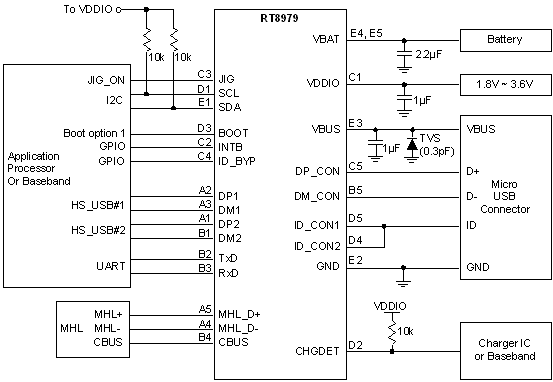
RT8979 由 USB 埠附件檢測器和 USB1、USB2、UART 和 MHL 選擇開關構成,它含有 I<SUP>2</SUP>C 控制介面和確定連接外設所屬類型的多種檢測方法。</br>RT8979 通過對 USB 介面 ID 引腳狀態和 VBUS 電壓的檢測來完成對外接附件的檢測,ID 引腳的阻抗和 VBUS 電壓的不同確定了不同的附件來源。作為主控制器的 MCU 通過 I<SUP>2</SUP>C 介面可對開關位置進行控制,也通過它來讀取附件檢測的結果。RT8979 也可檢測不同的充電器類型,其中包括專用充電器(它們的 D+/D- 處於短路狀態)和大功率的主機/集線器充電器。
RT8979 電路圖
anchor
productDetailSection
i18n(anchor-tab.product-detail-section.title)
productDetailSectionAnchorTab
orderingInformationSection
i18n(anchor-tab.ordering-information-section.title)
orderingInformationSectionAnchorTab
technicalDocumentationSection
i18n(anchor-tab.technical-documentation-section.title)
technicalDocumentationSectionAnchorTab
designToolSection
i18n(anchor-tab.design-tool-section.title)
designToolSectionAnchorTab
applicationSection
i18n(anchor-tab.application-section.title)
applicationSectionAnchorTab
supportSection
i18n(anchor-tab.support-section.title)
supportSectionAnchorTab
24
24
24
24
i18n(tabs.product-detail.title)
productDetailTabs
i18n(tab-item.parameter-section.title)
parameterSection
parameterSectionTab
i18n(tab-item.package-size-pin-size-section.title)
packageSizePinsSizeSection
packageSizePinsSizeSectionTab
i18n(tab-item.product-feature-section.title)
productFeatureSection
productFeatureSectionTab
24
24
24
24
buttonSeeProductDifferences
text-with-icon
right
secondary-m
tertiary
i18n(button-item.see-product-differences.button-label)
i18n(button-item.see-product-differences.button-link)
_self


false
buttonFindOtherCategory
text-with-icon
right
secondary-m
tertiary
i18n(button-item.find-other-category.button-label)
i18n(button-item.find-other-category.button-link)
_self
false
32
32
32
32
scrollable-table
parameterTable
normal-table
table-group
package-size-pins-size
packageSizePinsSizeTable
productFeature
<div class="spec-list"><ul class="lv1"><li>支援高速 USB 應用(USB1 和 USB2) </li><li>UART 和 MHL 切換開關 </li><li>附件插、拔中斷提醒 </li><li>支援工廠模式 </li><li>28V 耐壓 </li><li>I<sup>2</sup>C 控制介面 </li><li>DP_CON/DM_CON 端子集成 TVS 二極體,保護能力達 ±15V </li><li>ID_CON 端子集成 TVS 二極體,保護能力達 ±20V </li><li>支持 USB BC1.2 </li></ul></div>
24
24
24
24
i18n(tabs.ordering-information.title)
orderingInformationTabs
i18n(tab-item.product-section.title)
productSection
productSectionTab
i18n(tab-item.evb-section.title)
evbSection
evbSectionTab
i18n(tab-item.ordering-detail-section.title)
orderingDetailSection
orderingDetailSectionTab
24
24
24
24
productImageSwitcher
RT8979 訂購資訊

normal-table
card-list
products
productTable
evbImageSwitcher

normal-table
card-list
evb
evbTable
orderingDetail
technical-documents
RT8979
technicalDocumentMultipleTable
design-tools
RT8979
designToolMultipleTable
32
56
56
56
rt-blue-800
i18n(text.application-title.text-content)
applicationTitle
withLine
24
24
24
24
<div class="spec-list"><ul class="lv1"><li>移動應用 </li><li>智慧手持設備 </li><li>平板電腦 </li></ul></div>
applicationContent
35
35
35
35
keywordList
56
56
56
56
rt-blue-800
i18n(text.support-card-title.text-content)
supportCardTitle
withLine
40
40
40
24
supportCards
i18n(support-card-item.technical-support.title)
i18n(support-card-item.technical-support.description)
i18n(support-card-item.technical-support.learn-more-text)
i18n(support-card-item.technical-support.url)
technicalSupportCard
i18n(support-card-item.ordering.title)
i18n(support-card-item.ordering.description)
i18n(support-card-item.ordering.learn-more-text)
i18n(support-card-item.ordering.url)
orderingSupportCard
i18n(support-card-item.sales.title)
i18n(support-card-item.sales.description)
i18n(support-card-item.sales.learn-more-text)
i18n(support-card-item.sales.url)
salesSupportCard
56
56
56
32